TL;DR
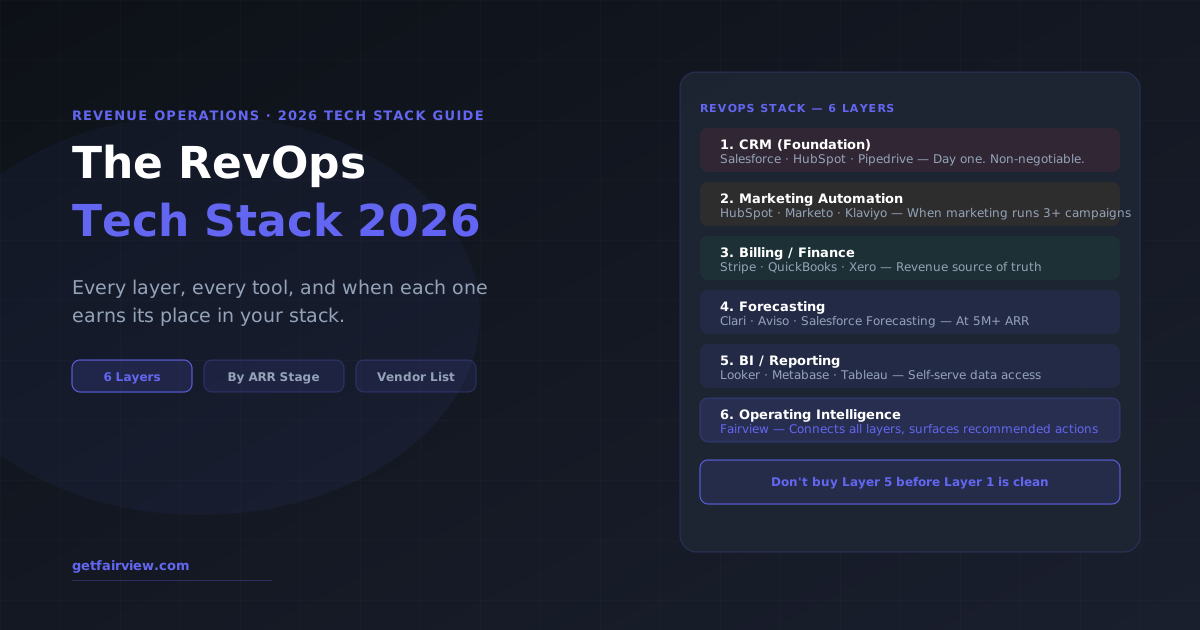
The RevOps tech stack has 6 layers: CRM, marketing automation, billing/finance, forecasting, BI/reporting, and operating intelligence. Build in this order. At 0–5M ARR, you need Layer 1–3. At 5–20M, add Layer 4. At 20M+, add Layer 5–6. The most common mistake: buying Layer 5 (BI) before fixing Layer 1 (CRM data quality). A Tableau dashboard built on dirty CRM data produces beautiful lies.
The Order of Operations for Building Your RevOps Stack
Every RevOps tool vendor wants you to believe their product is the starting point. It is not. The correct sequence is:
- Clean your CRM data first. No reporting tool, forecasting platform, or intelligence layer produces trustworthy outputs from bad CRM data. The first 90 days of any RevOps build should be focused on CRM architecture, stage definition, and data hygiene — before buying anything else.
- Connect your billing system as the revenue source of truth. Revenue from the CRM is always slightly wrong. Revenue from the billing system (Stripe, QuickBooks) is what accounting uses. Build all revenue reporting from billing, not CRM.
- Add forecasting tools when manual forecasting takes more than 4 hours per week. Before that point, a spreadsheet built on CRM data is sufficient and more maintainable.
- Add BI when stakeholders need self-serve data access. If the RevOps team is the only consumer of data, a BI tool is overhead. When business leaders want to pull their own reports, a BI tool pays for itself in RevOps time saved.
- Add operating intelligence when the team is spending more time on data collection than on analysis. This is the layer that connects all other tools and surfaces recommended actions automatically.
Layer 1: CRM (Foundation — Day One)
The CRM is the foundation of the entire RevOps stack. Every tool you add later will connect to, query, or depend on the CRM. The choice of CRM vendor matters less than the quality of the implementation.
| Vendor | Best For | Starting Price |
|---|---|---|
| Salesforce | 10M+ ARR, complex sales motions, enterprise scale | $25/user/month (Starter) |
| HubSpot | 1M–20M ARR, inbound-led growth, marketing alignment | Free (limited) / $45/month |
| Pipedrive | Under 5M ARR, sales-focused teams, simple pipeline | $14/user/month |
| Attio | Modern PLG or product-led teams at any stage | $34/user/month |
CRM implementation principles that matter more than vendor choice:
- Define deal stages based on buyer actions, not seller activities
- Require 5 or fewer mandatory fields — more means lower adoption
- Connect CRM to billing immediately so revenue data is reconciled weekly
- Run a data audit every quarter — stale opportunities are the most common source of inaccurate forecasts
Layer 2: Marketing Automation
Marketing automation manages the pipeline between marketing touch and sales handoff. It tracks lead behavior, runs nurture sequences, manages list segmentation, and (critically) provides the attribution data that RevOps needs to evaluate marketing channel performance.
| Vendor | Best For | When to Add |
|---|---|---|
| HubSpot Marketing | If you already use HubSpot CRM — easiest integration | At first outbound or content campaign |
| Marketo | Enterprise B2B, complex multi-touch attribution | 10M+ ARR |
| Klaviyo | Ecommerce / DTC, email and SMS automation | When email list exceeds 5,000 contacts |
| ActiveCampaign | SMB, strong automation at lower cost | Under 5M ARR |
Layer 3: Billing and Finance Integration
The billing system is the true source of revenue data. RevOps teams that run reporting from the CRM instead of the billing system work with numbers that are always slightly wrong — because CRM deals close before invoices are paid, refunds are not reflected, and contract amendments lag.
| Vendor | Best For |
|---|---|
| Stripe | SaaS, subscription billing, online-first businesses |
| QuickBooks | SMB accounting with strong reporting |
| Xero | SMB accounting, strong integrations, popular outside the US |
| Maxio / Chargebee | SaaS-specific subscription management and MRR/ARR reporting |
Connecting billing to the RevOps reporting layer is the highest-return data infrastructure investment most early-stage teams can make. It eliminates the weekly reconciliation between Finance and Revenue reporting.
Layer 4: Forecasting Tools (Add at 5M+ ARR)
Dedicated forecasting tools add value when the manual forecasting process — spreadsheet-based, updated weekly by RevOps — takes more than 4 hours per week. Before that threshold, the cost and complexity of a forecasting tool exceeds its benefit.
| Vendor | Strength | Best ARR Range |
|---|---|---|
| Clari | AI-driven pipeline inspection, rep-level signals | 10M+ ARR |
| Aviso | ML-based deal scoring, strong for enterprise sales | 20M+ ARR |
| Salesforce Forecasting | Integrated if already on Salesforce | Any Salesforce user |
| Gong Forecast | Conversation intelligence + forecast in one platform | 10M+ ARR |
| Fairview | Forecast + margin + pipeline in a single operating view | 2M–30M ARR |
Layer 5: BI and Reporting (Add When Stakeholders Need Self-Serve)
Business intelligence tools allow non-RevOps stakeholders to pull their own reports without filing a request. The trigger for this layer: RevOps is spending more than 6 hours per week building custom reports for different stakeholders.
| Vendor | Strength | When to Buy |
|---|---|---|
| Looker (Google) | Enterprise scale, strong data modeling layer | 20M+ ARR, data team exists |
| Tableau | Visual analytics, strong for complex dashboards | 15M+ ARR |
| Metabase | Open source, easy self-serve, low cost | Any stage once SQL is needed |
| Databox | Marketing-focused dashboards, low code | Under 10M ARR for marketing KPI tracking |
The critical warning: do not buy a BI tool until the CRM and billing data it will connect to are trustworthy. A Tableau dashboard built on inconsistent CRM data produces beautiful, misleading outputs. Clean the data first.
Layer 6: Operating Intelligence (Add at 10M+ ARR)
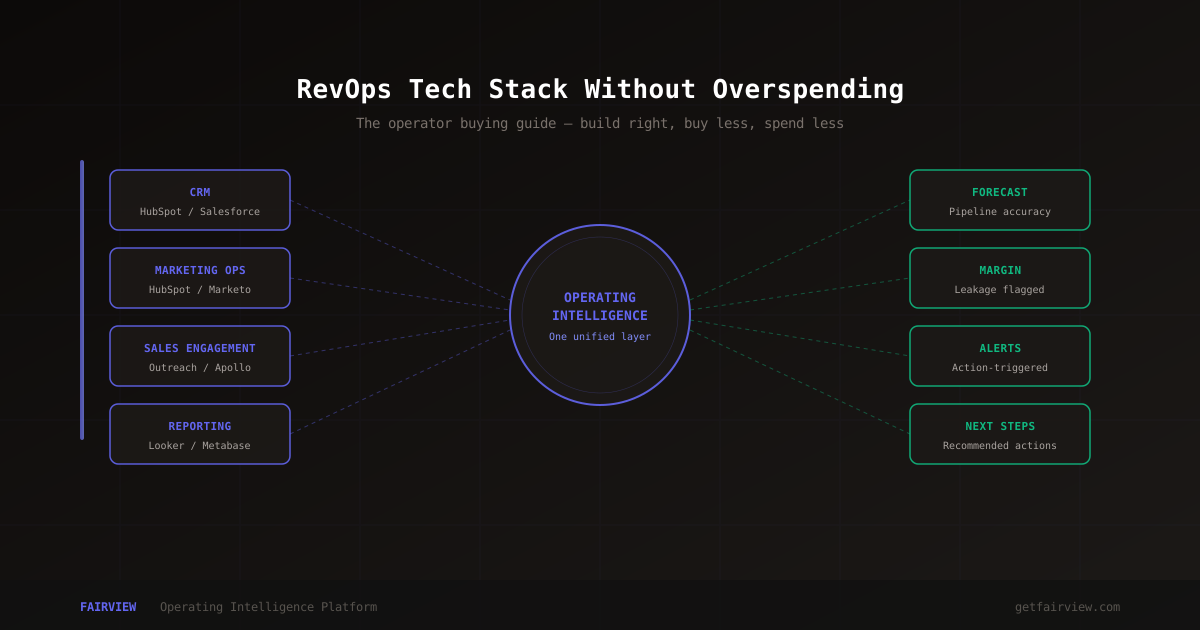
Operating intelligence platforms connect all other stack layers and surface recommended actions — not just metrics. This is the layer that transforms the RevOps team from a reporting function into a decision-support engine.
The key distinction between a BI dashboard (Layer 5) and an operating intelligence platform (Layer 6): BI shows you what happened. An OI platform shows you what is happening, why it is happening, and what you should do about it — with specific recommendations attached.
For a detailed breakdown of what separates operating intelligence from business intelligence, the OI vs. BI guide covers the full comparison including use cases and decision framework.
FAIRVIEW — LAYER 6
Operating intelligence for your RevOps stack
Connects CRM, billing, and ad data. Surfaces pipeline health, forecast, and recommended actions automatically — every week.
Book a DemoRevOps Tech Stack by ARR Stage
| Stage | Stack | Monthly Cost |
|---|---|---|
| Pre-revenue – 2M ARR | HubSpot Free or Pipedrive + Stripe + Google Sheets | $0–$200 |
| 2M – 5M ARR | HubSpot Growth + Stripe + QuickBooks + basic BI | $500–$1,500 |
| 5M – 15M ARR | Salesforce or HubSpot Pro + Marketo + Billing + Forecasting + Metabase | $3,000–$8,000 |
| 15M – 30M ARR | Full stack above + Looker or Tableau + Fairview | $8,000–$18,000 |
| 30M+ ARR | Enterprise CRM + data warehouse + full BI + OI + Snowflake | $15,000–$40,000+ |
Budget Benchmarks
RevOps tech stack spend as a percentage of ARR typically falls between 0.5% and 2%. Under 0.5% usually means the team is under-tooled and spending significant time on manual work. Over 2% usually means the team is over-tooled with licenses that go unused.
The highest-ROI purchase in most RevOps stacks: CRM data hygiene work. It is not a tool — it is a project — but it extracts more value from every existing and future tool than any new software purchase.
Common RevOps Stack Mistakes
- Buying BI before cleaning CRM data. Garbage in, garbage out — no dashboard fixes bad underlying data.
- Running two CRMs simultaneously. When Marketing uses HubSpot and Sales uses Salesforce without a clean integration, data splits and creates two versions of truth.
- Over-buying features in the CRM tier. Salesforce Enterprise has 40% more features than most sub-20M ARR companies use. The unused features create complexity without value.
- Confusing revenue intelligence (conversation analysis) with operating intelligence (cross-system action layer). Gong and Chorus are revenue intelligence tools — they analyze sales conversations. Operating intelligence connects all GTM systems and surfaces actions. They solve different problems.
- Underestimating implementation cost. Every tool requires configuration, training, and data migration. Budget 2–4x the first-year license fee for total cost of ownership including implementation.
The Hidden Cost of the Wrong Stack Order
The most common and expensive RevOps mistake is buying tools out of sequence. It happens because tool selection is often driven by a problem that is visible and urgent — "we need better forecasting" — rather than by an honest audit of whether the data foundation supports the desired capability.
The pattern looks like this: a company at $8M ARR buys a forecasting tool. The tool connects to the CRM. The CRM has inconsistent deal-stage data, missing close dates, and deals that have been open for 18 months without activity. The forecasting tool ingests the data and produces a confident-looking forecast that is wrong. The team loses trust in the tool. The tool is abandoned or underused. Six months later, the same conversation happens about a different tool.
The fix is sequencing. Before purchasing any Layer 4 or above tool, audit Layer 1 first. Specifically: what percentage of deals have a defined close date? What is the distribution of deal ages — how many have been open more than 90 days? What is the CRM completeness rate for fields the forecasting model requires? If the answer to any of these is "we do not know," start there.
The cost of this mistake is not just the wasted software spend. It is the six to twelve months of organizational trust eroded by tools that do not work because the data underneath them was never ready.
Integration Architecture: What to Avoid
The RevOps stack in 2026 is typically not a purpose-built suite from one vendor. It is a set of best-of-breed tools connected by integrations. The integration architecture determines how much operational overhead the team carries and how reliable the data flow is.
Three integration patterns to avoid:
- Native integrations only: Native integrations are convenient but often shallow. A CRM's native QuickBooks integration may sync invoices but not payment timing or refunds. Before relying on a native integration for margin or revenue reporting, verify exactly what data fields sync, in what direction, and on what schedule.
- Zapier for anything revenue-critical: Zapier-style tools are appropriate for notifications and lightweight automations. They are not appropriate for revenue data pipelines. Data loss, failed zaps, and rate limits create gaps in revenue data that are difficult to detect and hard to backfill.
- Custom ETL built by engineers: Custom-built data pipelines require engineering maintenance indefinitely. API changes at source systems break pipelines. Schema changes in the CRM break transformations. Unless the team has dedicated data engineering headcount, purpose-built integration tools cost less over a 3-year horizon than custom-built alternatives.
The operating intelligence layer — whether Fairview or another tool — should ideally handle the integration complexity so that the RevOps team is consuming clean, joined data rather than maintaining the plumbing. For more on the RevOps team structure that manages this stack, see our guide to building a RevOps team.
Key Takeaways
- The RevOps stack has 6 layers: CRM, marketing automation, billing, forecasting, BI, and operating intelligence
- Build in layer order — never add Layer 5 until Layer 1 has clean data
- At 0–5M ARR, you need Layers 1–3. At 5–20M, add Layer 4. At 20M+, add Layers 5–6
- RevOps stack budget benchmark: 0.5–2% of ARR annually
- The highest-ROI investment in most stacks is not a new tool — it is a CRM data audit
- Buying out of sequence is the most expensive RevOps mistake — forecasting tools built on dirty CRM data produce wrong answers that erode team trust
What is the best CRM for RevOps teams?
The best CRM for RevOps depends on stage. Salesforce is the gold standard for 10M+ ARR companies with complex sales processes and enterprise integrations. HubSpot is the most popular choice for 1M–20M ARR for its balance of features, usability, and marketing integration. Pipedrive is strong for sales-focused teams under 5M ARR. The CRM choice matters less than data quality and consistent stage definitions across the entire GTM team.
How much should a RevOps tech stack cost?
A typical RevOps tech stack budget: Under 5M ARR — $500–$2,000/month for CRM and marketing automation. 5M–20M ARR — $3,000–$8,000/month adding forecasting and BI. 20M+ ARR — $10,000–$25,000/month for the full stack including operating intelligence and data infrastructure. As a percentage of ARR, 0.5–2% is the healthy range. Under 0.5% usually means under-tooled with too much manual work. Over 2% typically means licenses that are not being used.
Siddharth Gangal
Founder, Fairview. Writes about RevOps tooling, operating systems, and the infrastructure decisions that separate predictable growth from reactive mode.
LinkedIn →