.svg)
TL;DR
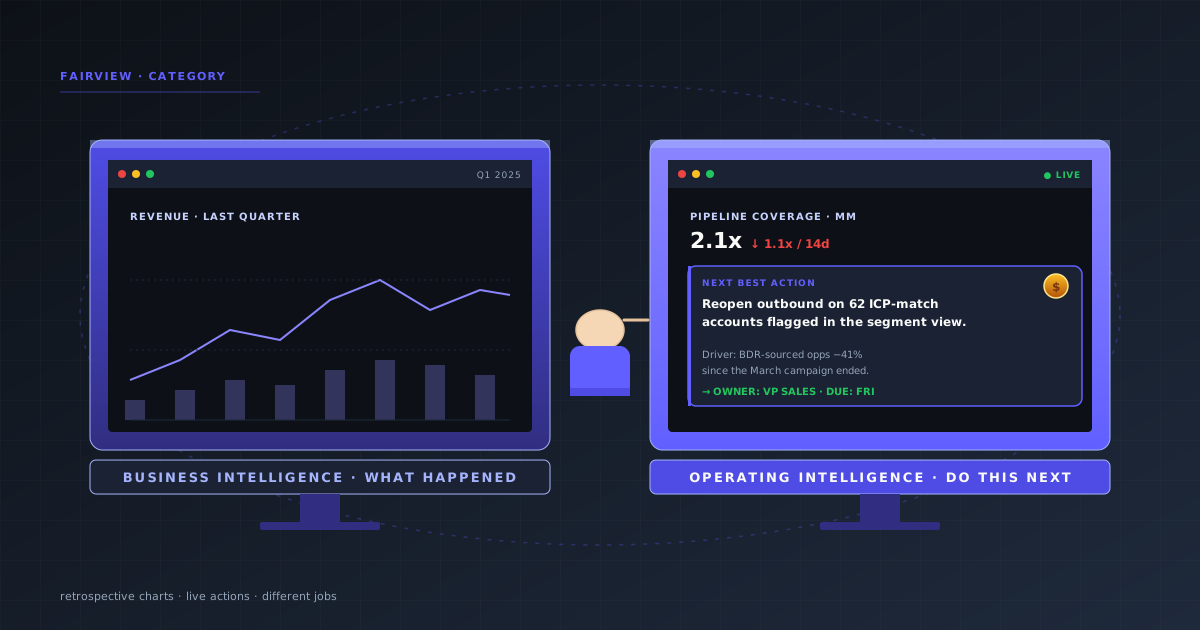
- BI answers "what happened?" OI answers "what should we do next?"
- BI serves analysts building dashboards. OI serves operators running weekly reviews.
- BI output is a chart. OI output is a named action with an owner and a deadline.
- Most growth-stage B2B and DTC companies need OI alongside BI, not instead of it.
- Fairview is Operating Intelligence purpose-built for the operator, not the analyst.
Operating intelligence vs business intelligence is the question that matters only when the dashboards stop being enough. At some point between $2M and $30M ARR, most teams notice that their BI stack answers last week’s question perfectly and this week’s question not at all.
BI is not broken. It is simply pointed at a different problem. The gap is not better charts; it is a different category of software that joins live operating data to the decision an operator needs to make right now.
This post draws the line cleanly: definitions, time horizons, users, outputs, and when to use each. Complements the RevOps pillar, KPI set, and weekly revenue review.
What is business intelligence?
Definition
Business intelligence (BI): the category of software that turns historical data from a warehouse into dashboards, charts, and reports used to understand what happened. Tools include Looker, Tableau, Power BI, and Metabase. Built for analysts; optimized for retrospective reporting.
BI emerged in the 1990s and scaled in the 2010s alongside the data warehouse. Its shape is SQL-driven, analyst-built, chart-output. It is genuinely excellent at board decks, quarterly reviews, and answering well-defined historical questions.
Where it struggles: anything live, anything cross-functional across CRM + billing + ads at the same time, anything that needs to be turned into an action on a weekly cadence.
What is operating intelligence?
Definition
Operating intelligence (OI): the category of software that joins live data across the revenue stack (CRM, billing, ads, finance) into one operating view and outputs named next-best actions for operators to run the business this week. Built for COOs, RevOps, and founders; optimized for decisions, not retrospection.
OI is a newer category, enabled by two shifts: connected SaaS APIs that expose operating data natively, and LLMs grounded on that data that can turn variance into a sentence. It sits where BI ends — beyond "what happened" toward "what do we do, who owns it, and when."
The side-by-side
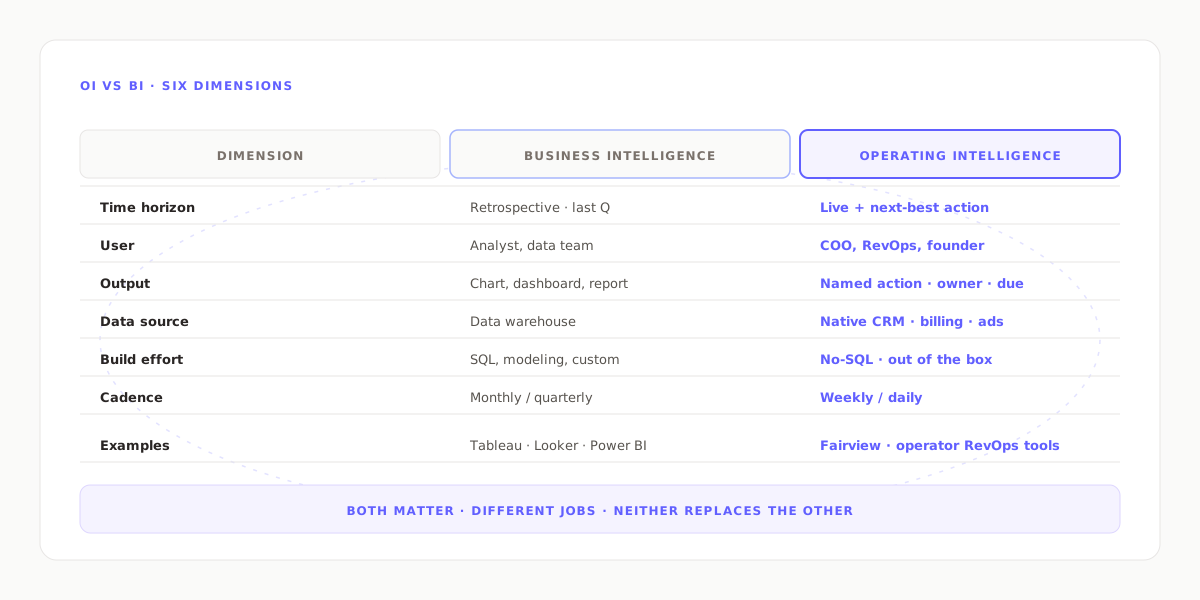
| Dimension | Business Intelligence | Operating Intelligence |
|---|---|---|
| Time horizon | Retrospective (last week/month/Q) | Live + next-best action |
| User | Analyst, data team | COO, RevOps, founder |
| Output | Chart, dashboard, report | Named action, owner, deadline |
| Data source | Data warehouse | Native connectors to CRM, billing, ads |
| Build effort | SQL, modeling, custom dashboards | Pre-joined, no-SQL, out of the box |
| Cadence | Quarterly / monthly | Weekly / daily |
| Examples | Tableau, Looker, Power BI | Fairview, operator-grade RevOps tools |
Key insight
BI makes you look smart about last quarter. OI makes you right about this week. Both matter. Neither replaces the other.
Same metric, different output
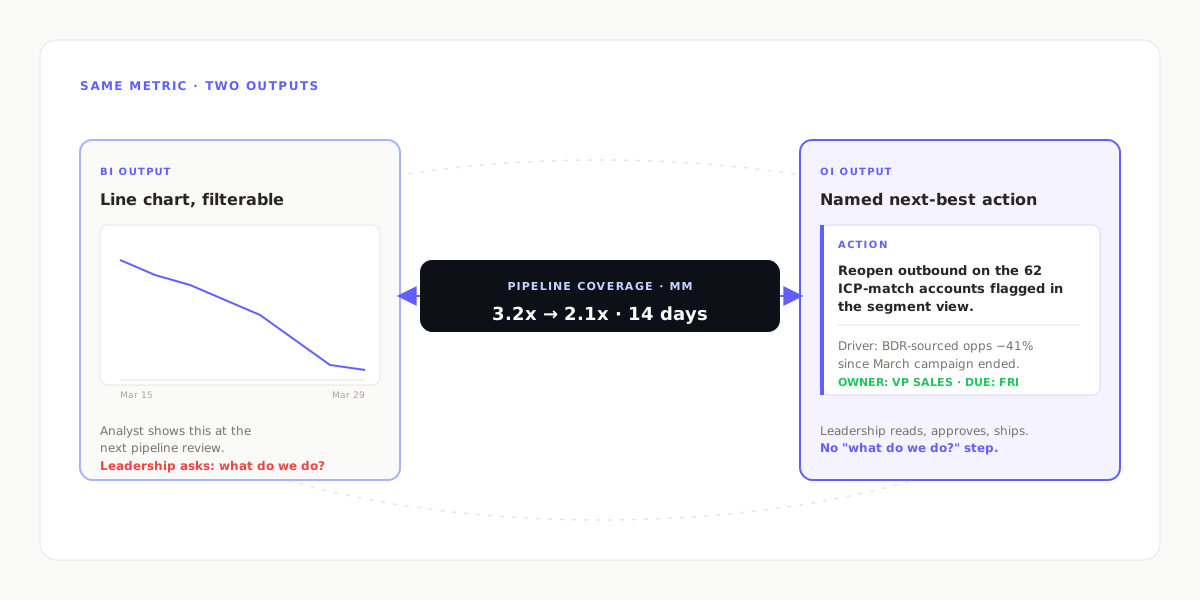
Consider one metric: pipeline coverage dropped from 3.2x to 2.1x in two weeks.
BI output: a line chart showing the decline, filterable by segment, with historical comparisons. The analyst presents it at the next pipeline review; leadership asks what to do about it.
OI output: "Mid-Market coverage dropped from 3.2x to 2.1x in 14 days. Driver: BDR-sourced opps down 41% since the March campaign ended. Action: reopen outbound on the 62 ICP-match accounts flagged in the segment view. Owner: VP Sales. Deadline: next weekly review."
Same data. Same metric. Two entirely different jobs done.
When you need BI, OI, or both
| Use case | BI | OI |
|---|---|---|
| Board deck, historical deep-dive | ✓ | — |
| Weekly operating review | — | ✓ |
| Forecast commit this quarter | — | ✓ |
| Ad hoc analyst question | ✓ | — |
| Pipeline health + risk calls | — | ✓ |
| Margin leak detection (live) | — | ✓ |
| Compliance / audit reporting | ✓ | — |
Most growth-stage companies end up with both. BI stays behind the data team for reporting. OI goes in front of the operating team for decisions. When operators try to run weekly reviews out of BI dashboards, the meeting quietly becomes a status theater; when analysts try to answer historical one-offs out of OI, they hit a wall.
Common misconceptions
- "OI is just real-time BI." Real-time data is necessary for OI but not sufficient. A live Tableau dashboard is still BI. The difference is the output type — named action vs chart.
- "We'll replace BI with OI." Usually a bad idea. BI does board decks and compliance better. OI does weekly operating decisions better. Different jobs.
- "OI is just AI on top of BI." AI helps. The bigger shift is data model + UX: pre-joined CRM+billing+ads, no-SQL interfaces, decision-first layouts.
- "BI can do everything OI does if we build enough dashboards." Technically yes; practically no. The team that builds 200 dashboards ends up with a second job: maintaining 200 dashboards.
Quote-ready
BI is the analyst’s tool. OI is the operator’s tool. They are not rivals. They just serve different hands.
How Fairview fits the OI category
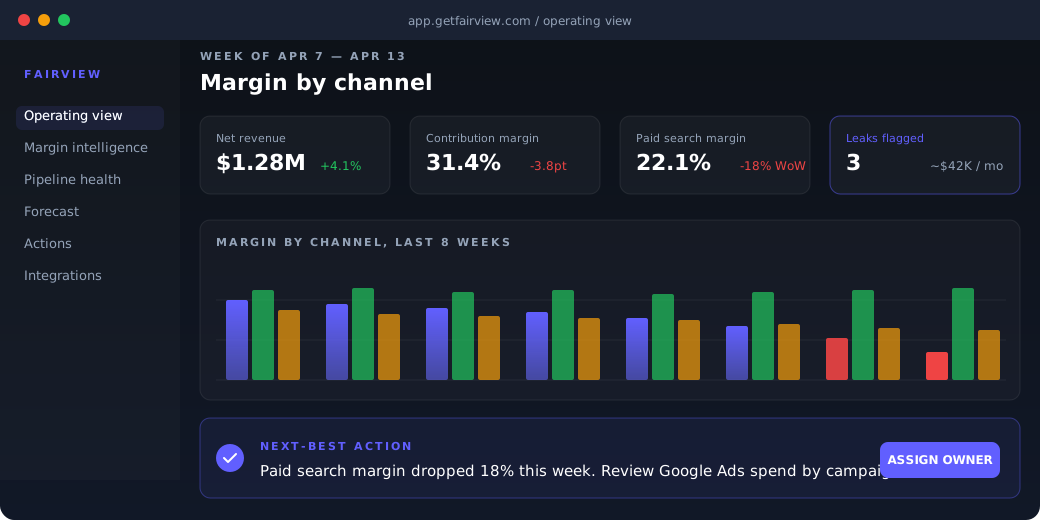
Fairview is Operating Intelligence for B2B and DTC operators. It connects natively to HubSpot, Salesforce, Pipedrive, Stripe, Shopify, QuickBooks, Xero, Google Ads, Meta Ads, and HubSpot Marketing Hub. The operating view joins all of them into one dashboard with pipeline, margin, forecast, and CAC in a single place.
The Next-Best Action Engine writes named prompts grounded in connected records. The Weekly Operating Report auto-generates every Sunday. Fairview sits next to your BI tool; it does not replace it.
See pricing for the plan that fits your stack. Or learn more about what operating intelligence is.
No SQL
Pre-joined across the stack
Actions
Not just charts
Weekly
Operating cadence built in
Key takeaways
- BI answers "what happened." OI answers "what should we do next."
- BI output is a chart. OI output is a named action with owner and deadline.
- BI serves analysts; OI serves operators. Different users, different jobs.
- Most growth-stage companies need both, not one instead of the other.
- OI is not real-time BI; the shift is data model, UX, and output type.
See what operating intelligence looks like.
Connect your CRM, billing, and ad platforms. Fairview returns pipeline, margin, and forecast as named actions, not just charts. 14-day trial, no card required.
Frequently asked questions
Business intelligence (BI) is the retrospective category — dashboards and reports that describe what happened last week, month, or quarter. Operating intelligence (OI) is the forward-looking category — live data joined to the decision an operator needs to make right now, usually paired with a named next-best action.
BI answers what happened. OI answers what to do next. Most operators need both, but they solve different jobs. BI for board and historical reporting; OI for the weekly operating review, pipeline and margin decisions, and cross-functional alignment across marketing, sales, and customer success.
COOs, RevOps leaders, CFOs running operating reviews, and founders of growth-stage B2B and DTC companies. OI serves the operator who needs to act this week. BI traditionally serves the analyst who needs to report last quarter.
Tableau is BI. It is a visualization layer that sits on top of a data warehouse, optimized for analyst-built dashboards. Operating intelligence tools are typically no-SQL, pre-joined across the revenue stack, and ship named actions rather than charts.
It is rarely a switch. Most growth-stage companies need OI alongside BI between $2M and $30M ARR, when the weekly operating cadence breaks under the weight of reconciling dashboards. BI stays for board reporting. OI handles the operating decisions.
Live pipeline coverage by segment with a named action, a forecast confidence score alongside the commit, a SKU that dropped below its margin band in the last 14 days, or the weekly operating report auto-generated with five metrics and three actions. These are OI outputs; a historical revenue-by-region chart is a BI output.