.svg)
TL;DR
- Shopify’s dashboard reports GMV, not profit. The “Total sales” number excludes every variable cost and treats timing of refunds casually.
- The six blind spots: ad spend, payment fees, shipping, COGS across variants, refund timing, and channel attribution.
- A brand can post a record sales week inside Shopify while losing money on every incremental order.
- True profit for a D2C store lives across Shopify, Stripe, Meta/Google Ads, and your accounting system — not in one tool.
- Fairview joins those sources and reports contribution margin per order, per SKU, and per channel on the same view.
Most Shopify merchants look at the dashboard every morning. It shows a big number, a graph that trends upward, and a cheerful green percentage. The number is real. The story it tells is not.
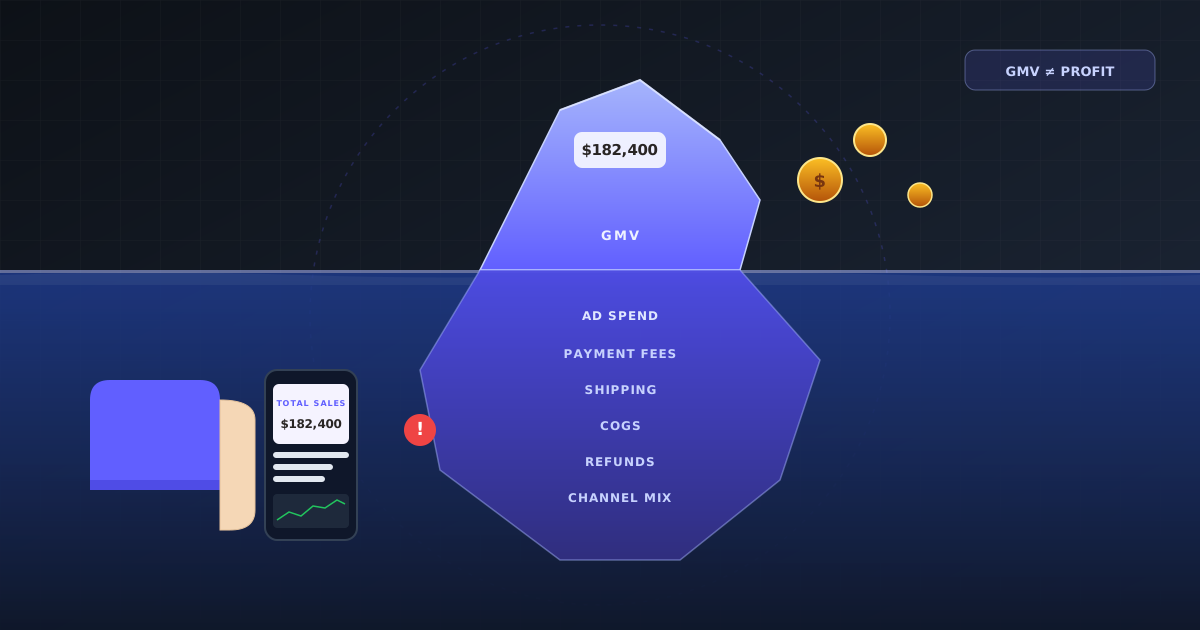
Shopify is a storefront. It measures what happens at the checkout, which is the sale price. It does not measure what the sale costs you to fulfill, what you paid to acquire the customer, or what the bank actually deposits once the fees come out. The headline "Total sales" tile is a gross merchandise value figure, not a profit figure, and the gap between the two is usually much larger than operators expect.
This post walks through the six specific ways the default dashboard overstates the business, shows what a profit-first view looks like instead, and explains why fixing it almost always requires a second tool. If you want the mental model behind the fix, start with the Cluster 1 hub on finding profit leaks or the contribution margin formula.
What Shopify’s revenue dashboard actually shows
Definition
Shopify “Total sales”: gross merchandise value of completed orders in the selected window, before discounts reverse it, before refunds settle, and before a single variable cost has been subtracted. It is a top-line activity measure, not an earnings measure.
The headline tile on the home screen aggregates order totals. Shopify’s own documentation calls this number Total sales, and defines it as gross sales minus discounts and returns (see Shopify’s sales report reference). That definition is accurate and still incomplete, because "sales minus discounts minus returns" is miles away from "money the business kept."
The default analytics views add a handful of secondary tiles: sessions, conversion rate, average order value, top products, returning customer rate. Every one of them is a top-of-funnel or revenue metric. None of them answer the only question that matters once a brand is post-product-market-fit: did last week’s activity leave us with more cash than it cost?
The six blind spots in the default dashboard
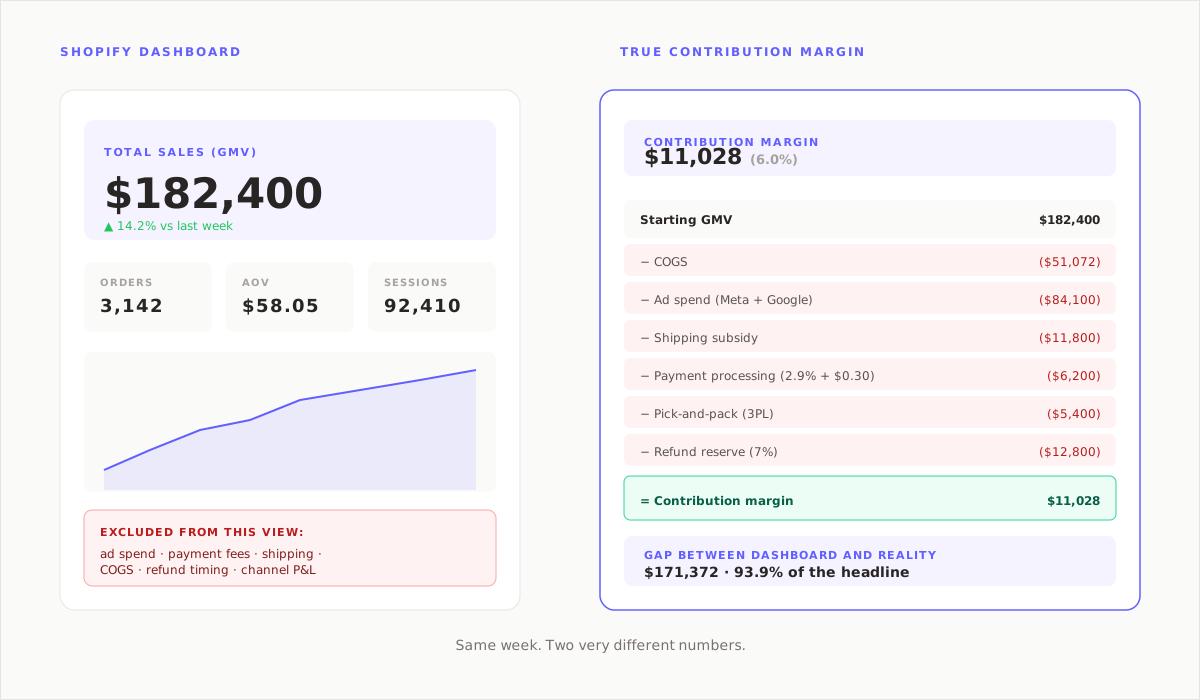
Six categories of cost or timing distortion live between the Shopify headline and true profit. In a typical D2C store, these collectively pull the real number 40 to 60 percent below the reported one.
1. Ad spend is never in the dashboard
The biggest single gap. Meta, Google, and TikTok spend live in the ad platforms, not in Shopify. A store can post $180,000 of sales in a week against $95,000 of ad spend, and the dashboard will only show the $180,000. Every growth brand I have worked with was surprised by how often ROAS looked fine and contribution per order did not.
2. Payment processing is invisible
Shopify Payments and Stripe take 2.5 to 3.5 percent plus a per-transaction fee. On a $48 AOV brand pushing 5,000 orders a month, that is roughly $7,000 to $10,000 a month that the dashboard does not subtract. The Payouts screen shows it, but the home screen never nets it out.
3. Shipping is counted as revenue, not cost
If customers pay for shipping, the fee lands in Total sales. If the brand pays the carrier, that cost is not reflected in the headline. A net-positive shipping line on the income statement is rare outside of high-AOV apparel; most brands lose 15 to 40 percent of the shipping collected once the carrier invoice arrives.
4. COGS needs to be entered, and rarely is
Shopify can compute gross profit if a cost per item is entered against every variant. Most stores do not keep this current. New SKU launches arrive without a cost, bundles get priced with the retail total, and manufacturer price increases do not flow back in. The Reports → Finances → Gross Profit view is either blank or stale in most D2C stores I audit.
5. Refund timing distorts the weekly view
Refunds flow back against the week they happen, not the week the order was placed. Promo-heavy weeks look great on Monday and mediocre three weeks later when the returns settle. The dashboard view always favors the current week over the cohort.
6. Channel attribution is sessions, not profit
Shopify’s channel reporting groups sessions by source using the last-click model. It tells you what sent traffic. It does not tell you what margin came back from each channel, because it has no view of ad spend or cost per acquisition. See contribution margin by channel for the rebuild.
Key insight
Shopify’s dashboard is not wrong. It is measuring the storefront. The storefront is not the business. The business is the storefront plus the ad platforms, the payment processor, the carrier, and the accounting system — and profit only exists when all five are joined.
A worked example: the $180K week that lost money
A skincare brand I worked with ran a February promo. The Shopify tile read $182,400 in sales. The founder posted it to the team Slack Friday afternoon. The actual week looked like this:
| Shopify Total sales | $182,400 |
| − Promo discounts already applied (22%) | (in tile) |
| − COGS at 28% | ($51,072) |
| − Meta & Google ad spend | ($84,100) |
| − Shipping subsidy (flat rate below cost) | ($11,800) |
| − Stripe / Shopify Payments fees (2.9% + $0.30) | ($6,200) |
| − Pick-and-pack at 3PL | ($5,400) |
| − Refund reserve (7% historical) | ($12,800) |
| Contribution margin (actual) | $11,028 |
$11,028 on $182,400. A 6 percent contribution margin against a 43 percent target. The week was not a disaster — it was slightly positive — but it was nowhere near what the Shopify tile suggested, and the founder was about to double down on the same promo the next week. That is the exact decision the dashboard encourages.
What D2C profit analytics actually needs
Three data planes have to join before a Shopify merchant can see true profit:
- Shopify order data. Line items, discount codes, refund status, shipping zone, variant-level COGS.
- Ad platform spend. Meta, Google, TikTok spend at the campaign level, tied back to orders through UTM or a deterministic match.
- Financial reality. Stripe or Shopify Payments payouts (fees net), the carrier invoice (true shipping cost), and the 3PL invoice (variable fulfillment labor).
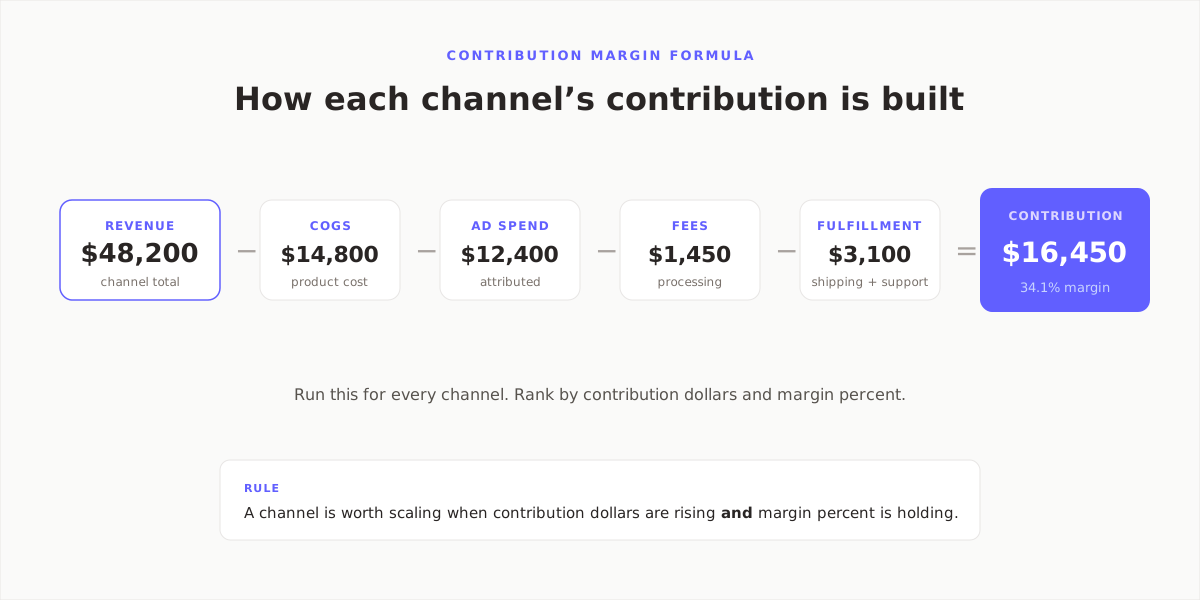
Once those three planes are joined, contribution margin can be computed per order. Aggregated the right ways, it becomes contribution margin per SKU, per channel, per campaign, per cohort. That is the view that changes decisions, because it answers the question the Shopify dashboard cannot: which of our growth levers is actually paying rent?
Quote-ready
You cannot fix a margin problem you measure in Shopify, because Shopify does not measure margin. It measures activity at the checkout.
How Fairview fixes the Shopify blind spot automatically
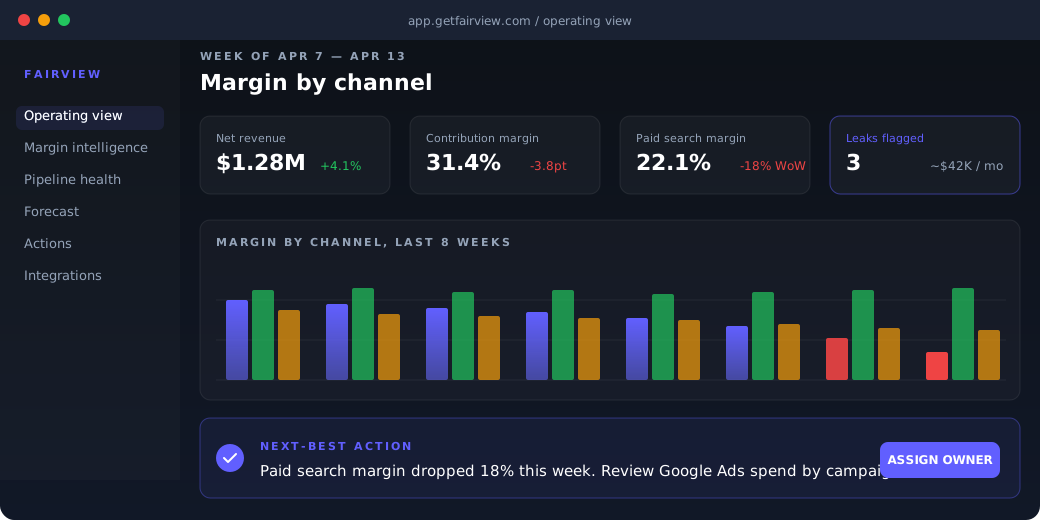
Fairview connects to Shopify, Stripe, Meta Ads, Google Ads, QuickBooks, Xero, HubSpot, Salesforce, and Pipedrive via native OAuth. Connection takes about ten minutes. Once the sources are linked, the operating view reconstructs every order with its full variable cost stack — not just the COGS entered in Shopify.
When contribution margin per channel moves past a configured threshold, Fairview writes a named next-best action: "Meta Prospecting contribution margin dropped from 18% to 4% this week. Driver: CAC up $12 with promo stacking. Budget impact: $21,400 this week at current pace. Recommendation: pull promo or raise price on bundle A."
See pricing and tiers for the plan that fits your stack.
Per order
True contribution margin, not GMV
10 min
To connect Shopify, Stripe, and ad accounts
10
Native integrations live today
Key takeaways
- Shopify’s revenue dashboard reports GMV, not profit.
- Six blind spots: ad spend, payment fees, shipping cost, COGS gaps, refund timing, and channel attribution.
- The delta between GMV and contribution margin is usually 40 to 60 percent in D2C.
- True profit requires joining Shopify with Stripe, ad platforms, and the accounting system.
- Decisions made on Shopify alone tend to double down on the worst-performing weeks.
See what your Shopify dashboard is hiding.
Connect Shopify, Stripe, and your ad accounts. Fairview returns contribution margin per order, per SKU, and per channel on day one. 14-day trial, no card required.
Frequently asked questions
No. The Shopify Analytics home dashboard reports Total sales, orders, sessions, and conversion rate. It does not subtract COGS, shipping costs, payment fees, ad spend, or refund timing. The Reports section can show a gross profit view if cost per variant has been entered, but even that view leaves out ad spend and variable fulfillment labor.
Gross merchandise value. The headline tile is total order value in the selected period, minus applied discounts and minus refunds that have already settled. It is a revenue signal, not a profitability signal, and it tells you how active the storefront was rather than how much cash the business retained.
It does not net out payment processing fees, outbound shipping cost, ad spend, or variable fulfillment. Refunds flow against the week they settle, not the week the order was placed, which inflates promo-heavy weeks in real time. The dashboard is accurate to its definition but the definition is narrower than most merchants realize.
Contribution margin computed per order, per SKU, and per channel. That requires joining Shopify order data with Stripe or Shopify Payments fees, ad spend from Meta and Google, carrier costs, 3PL fulfillment costs, and COGS from either variant-level entries or an accounting system. The output tells the merchant which orders were profitable, not just which orders happened.
Partially. If cost per variant is entered for every SKU, the Reports → Finances → Gross Profit view approximates gross margin. That view still omits ad spend, variable fulfillment, and carrier shipping costs, so it sits somewhere between GMV and true contribution margin rather than at contribution margin. For most D2C brands the variant costs are not kept current, so even that estimate tends to be stale.
Incomplete, not wrong. Shopify measures what it owns, which is the storefront transaction. Profit lives across Shopify, the ad platforms, the payment processor, the carrier, and the accounting system. The dashboard is honest about what it covers; the issue is operators treating it as the whole business when it is one plane of it.