.svg)
TL;DR
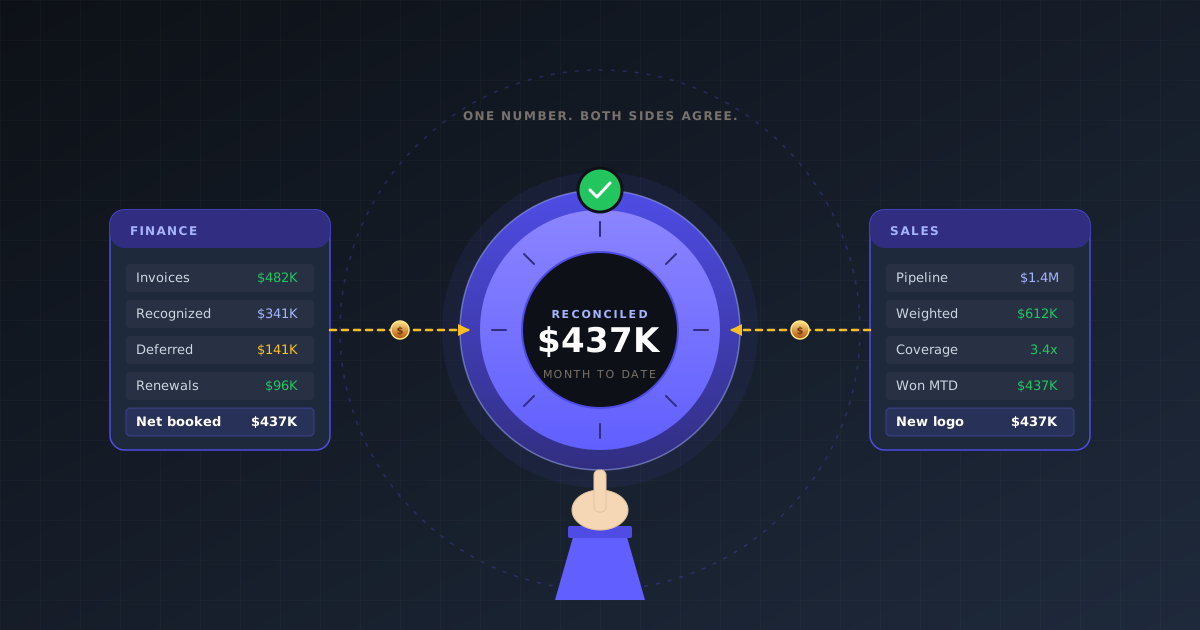
- A RevOps dashboard is only useful when finance and sales see the same number and both agree it is right.
- Reconciliation — not visualization — is the hardest part. CRM, billing, and ad data must tie on a common account ID before charts mean anything.
- Every durable RevOps dashboard has seven layers: pipeline health, velocity, conversion, forecast, booked revenue, retention, and unit economics.
- The fastest way to break trust is to mix bookings and recognized revenue on the same page without labeling them.
- Fairview reconciles HubSpot or Salesforce, Stripe, QuickBooks or Xero, and the ad platforms so the dashboard survives the weekly joint review.
A RevOps dashboard exists for one reason — the moment finance and sales walk out of the same meeting agreeing on the same number. If they walk out believing two different numbers, the dashboard has failed no matter how much Looker time went into it.
Most RevOps dashboards do not fail because the charts are wrong. They fail because revenue means one thing in HubSpot, another in Stripe, and a third in the finance sheet. By the time the VP of Sales pulls up her pipeline view and the CFO pulls up his bookings report, they are reading two honest reports that describe different things.
This guide covers what a RevOps dashboard needs to include, how to reconcile your data sources so the numbers hold up, and how to design the view so both sides of the table trust the output. It pairs with RevOps KPIs, the RevOps tech stack, and the revenue operations guide.
What is a RevOps dashboard?
Definition
RevOps dashboard: a single operational view combining pipeline, bookings, billings, attribution, and retention data into one reconciled source of truth, so the go-to-market team and the finance team act on the same numbers every week.
It is not a pipeline report. A pipeline report describes the CRM. It is not a financial report. A financial report describes recognized revenue. A RevOps dashboard bridges them — which is why it is hard to build, and why most attempts stall somewhere around version three.
The practical test is simple. If the CFO and the VP of Sales can open the same page on Monday morning and agree on a single number for new business this month, the dashboard works. If they open it and one starts adjusting for renewals while the other argues about deal dates, the dashboard is a Rorschach test.
Why finance and sales distrust each other's numbers
Three recurring reasons:
- Different revenue definitions. Sales books new logos as ARR the day the contract signs. Finance recognizes revenue only when billing starts. A $240K annual deal signed on the last day of Q2 adds $240K to pipeline reporting immediately and $0 to recognized revenue for weeks.
- Timing mismatches. Pipeline moves in real time. Billing lags 1–5 days. Ad attribution lags 7 days. Cohort maturity lags weeks. A dashboard that does not label its own freshness produces arguments rather than decisions.
- Inconsistent opportunity data. Sales marks a deal Closed-Won on the verbal yes. Legal redlines land two weeks later. Renewals get mis-tagged as new business. Implementation slippage shifts the month the revenue lands. None of this is malicious — it is what CRMs do when reconciliation is absent.
Key insight
The hard part of RevOps reporting is not visualization. It is reconciling three systems that all call different things "revenue."
The seven layers of a durable RevOps dashboard
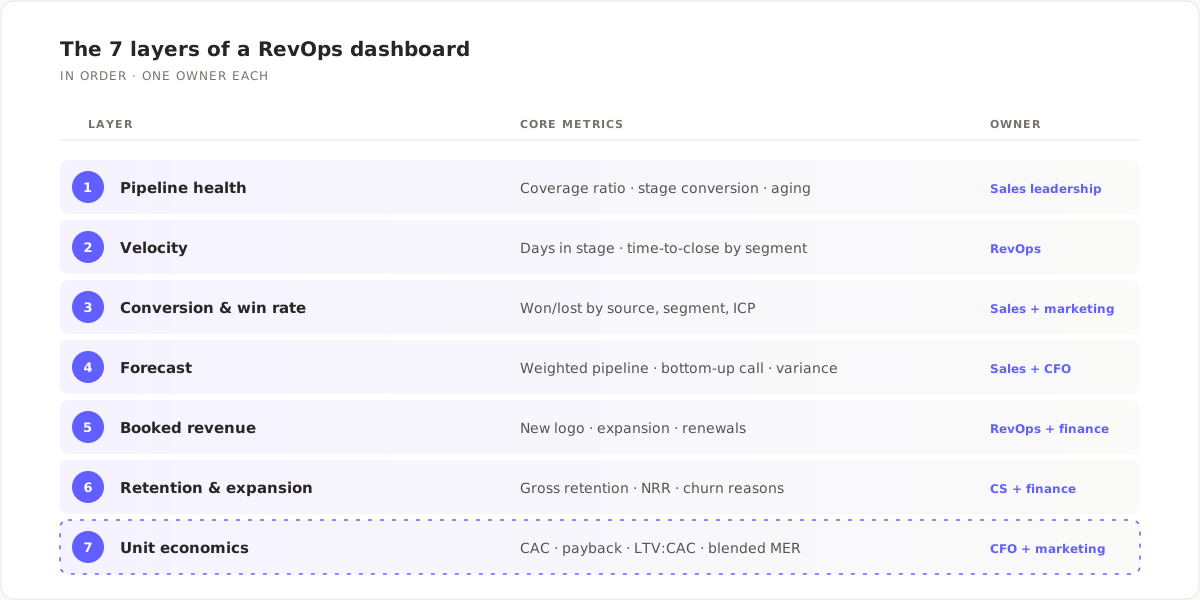
Every RevOps dashboard that survives a full year includes these seven layers, in this order, with a named owner on each one.
| Layer | Core metrics | Owner |
|---|---|---|
| 1. Pipeline health | Coverage ratio, stage conversion, aging | Sales leadership |
| 2. Velocity | Days in stage, time-to-close by segment | RevOps |
| 3. Conversion & win rate | Won/lost by source, segment, ICP | Sales + marketing |
| 4. Forecast | Weighted pipeline, bottom-up call, variance | Sales leadership + CFO |
| 5. Booked revenue | New logo, expansion, renewals | RevOps + finance |
| 6. Retention & expansion | Gross retention, NRR, churn reasons | CS + finance |
| 7. Unit economics | CAC, payback, LTV:CAC, blended MER | CFO + marketing |
Skip a layer and you force one function to keep a shadow spreadsheet. The shadow spreadsheet eventually becomes the real dashboard, and the official one stops getting opened. For the deeper metric list inside each layer see the RevOps KPIs breakdown.
The data sources a trustworthy dashboard needs
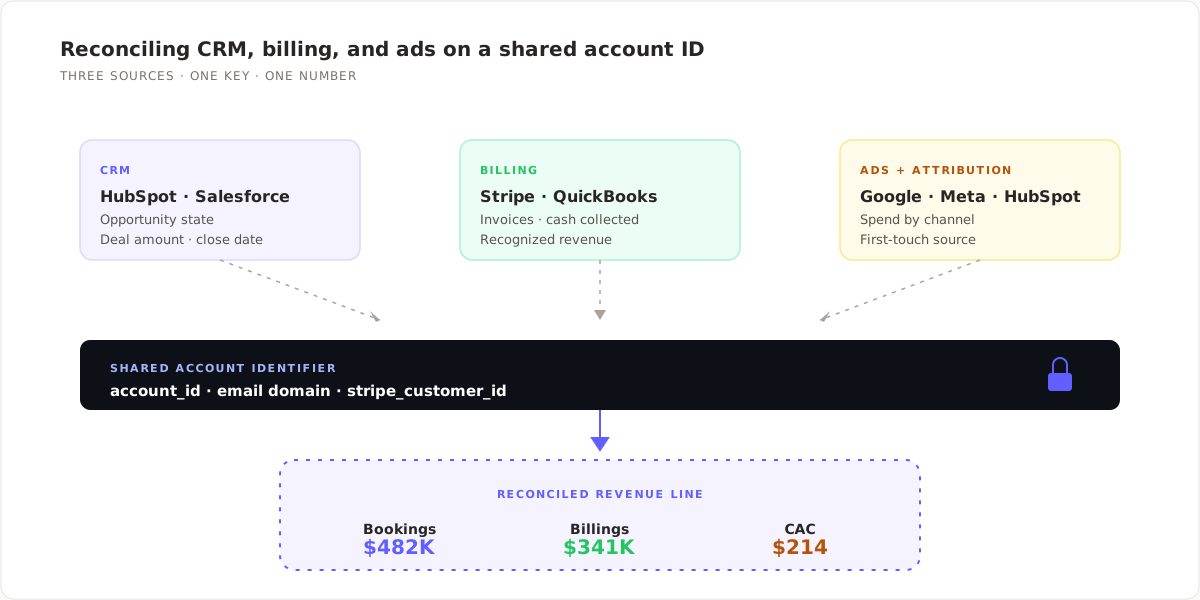
Three data families have to reconcile before the dashboard is worth opening:
- CRM: HubSpot, Salesforce, or Pipedrive. Supplies opportunity state, deal amount, deal source, close date, and segment.
- Billing: Stripe, QuickBooks, Xero, or Chargebee. Supplies invoices issued, revenue recognized, renewals booked, and cash collected.
- Ads & attribution: Google Ads, Meta Ads, HubSpot Marketing Hub. Supplies spend and first-touch channel data that feeds CAC and payback.
A single source is not enough. Pull only from the CRM and finance will distrust it within a month. Pull only from billing and sales will distrust it on week one. You need both, tied on a common account identifier — usually an email domain, a Stripe customer ID, or an ID your RevOps team maintains manually.
The reconciliation layer is the piece most teams underbuild. Without it, a $240K contract signed on June 30 shows up as $240K of new bookings in the pipeline view and $0 of recognized revenue in the finance view — and nobody can explain the gap inside a 30-minute meeting.
How to choose which metrics to display
Apply three filters before putting a metric on the main view. If a candidate metric fails any of them, move it to a role-specific sub-tab or kill it.
- Will both finance and sales act on it this week? If only one side will ever do anything about it, the main view is the wrong home. Put it on a sub-tab owned by that function.
- Can it be reconciled back to a system of record? Every number should trace cleanly to Stripe, the GL, the CRM, or an ad platform. A metric with no source has no place on the executive view.
- Does it have a clear threshold? A metric without a good/bad line is a chart, not a decision. If you cannot say what "bad" looks like in one sentence, the reader cannot act.
Four failure modes that kill dashboard trust
| Failure mode | What goes wrong | Fix |
|---|---|---|
| Vanity headline metric | Total pipeline $ shown without stage weighting | Always show weighted alongside raw |
| Bookings + billings mixed | Two definitions of revenue on one page, unlabeled | Label each number clearly; show side-by-side |
| No freshness indicator | Viewer does not know when data last refreshed | Show "as of" timestamp on every panel |
| No named owner | Nobody responds when a number looks wrong | Assign one owner per panel in plain text |
Quote-ready
The fastest way to kill a RevOps dashboard is to put bookings and recognized revenue on the same page without labeling them. Finance will stop opening it within two weeks.
Designing for finance and sales at the same time
A dashboard that works for both functions follows a small number of design choices that most teams skip:
- Show bookings and billings on the same page, clearly labeled. Finance can read billings; sales can read bookings; both can see the gap.
- Break pipeline into new vs. renewal vs. expansion. Renewals dragged into "new business" are the classic trust killer.
- Show CAC in both blended and paid-only form. Paid-only CAC is the number marketing controls. Blended CAC is the number finance cares about.
- One shared account identifier between CRM and billing. If two systems disagree on what a single customer is, the dashboard will always be wrong.
- Visible "as of" timestamp on every panel. Do not ask the viewer to guess whether the CRM pulled at 9am and Stripe pulled at 2am.
For the forecast layer specifically, the dashboard should show both the weighted pipeline figure and the bottom-up rep call. The gap between the two is the single most operator-useful number on the whole page — it tells you whether the pipeline is healthier or sicker than the team believes. See forecast accuracy metrics for how to measure it over time.
How Fairview builds your RevOps dashboard automatically
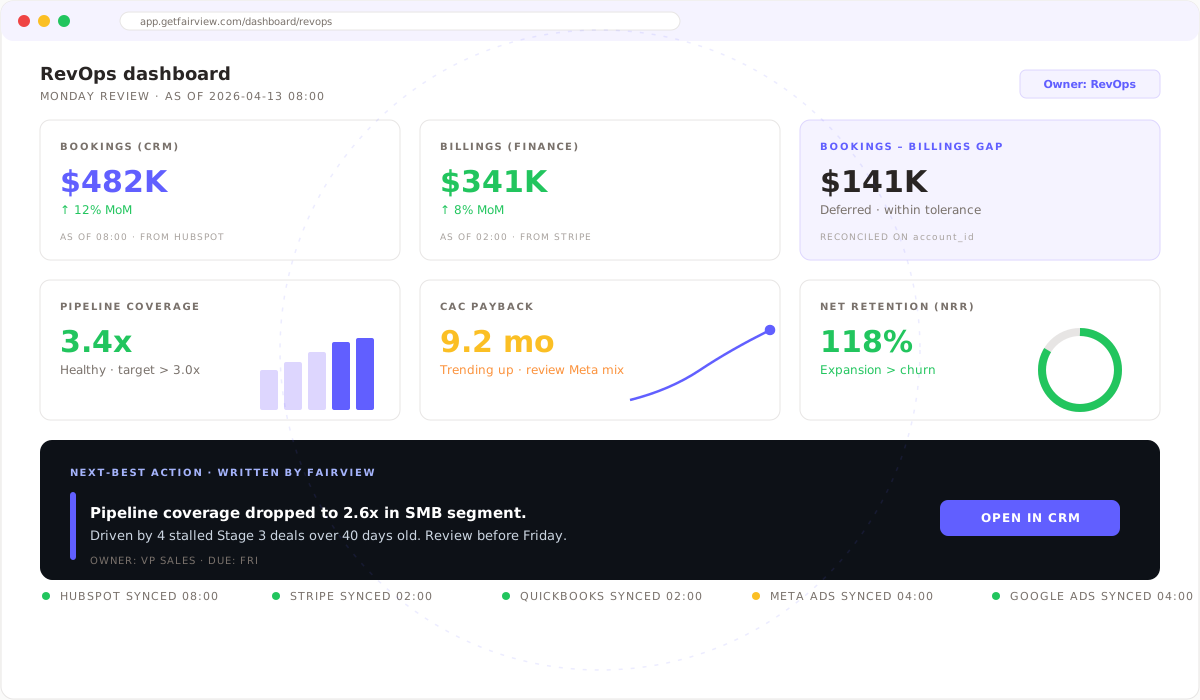
Fairview connects to HubSpot, Salesforce, Pipedrive, Stripe, QuickBooks, Xero, Shopify, Google Ads, and Meta Ads via native OAuth. Once connected, the operating view reconciles opportunity, invoice, and spend data on a shared account identifier, publishes the seven dashboard layers in order, and flags the three common reporting mismatches (bookings vs. billings drift, renewals miscategorized as new business, attribution latency) before they reach the weekly review.
When the dashboard drifts — bookings-to-billings ratio slipping, forecast variance widening past a threshold, pipeline coverage under 3x — Fairview writes a named next-best action: "Pipeline coverage dropped to 2.6x in the SMB segment, driven by 4 stalled Stage 3 deals over 40 days old. Owner: VP Sales. Review before Friday."
See pricing and tiers for the plan that fits your stack.
7 layers
Pipeline to unit economics
1 view
Reconciled across CRM + billing
10
Native integrations live today
Key takeaways
- The goal of a RevOps dashboard is one reconciled number both functions trust, not more charts.
- Reconciliation across CRM, billing, and ad data is the hard part. Visualization is downstream.
- Seven layers, one owner each: pipeline, velocity, conversion, forecast, booked revenue, retention, unit economics.
- Label bookings and billings separately. Show freshness timestamps. Assign owners.
- If a metric fails the "both functions will act on it" test, move it to a sub-tab.
See a reconciled RevOps dashboard on day one.
Connect your CRM, billing, and ad platforms. Fairview returns the seven layers reconciled on a shared account ID within hours. 14-day trial, no card required.
Frequently asked questions
A RevOps dashboard is a single operational view that combines pipeline, bookings, billings, attribution, and retention data into one reconciled source of truth. The point is to give sales and finance the same numbers to act on each week, instead of each team running its own parallel report that disagrees with the other at the worst possible moment.
RevOps owns the dashboard infrastructure and reconciliation layer. Each metric layer has a named business owner: sales leadership for pipeline and forecast, finance for bookings and retention, marketing and finance jointly for unit economics. "Named" matters — if the owner is a role, not a person, nothing gets fixed when a number looks wrong.
Seven layers: pipeline health (coverage, stage conversion, aging), velocity (time-to-close, days in stage), conversion and win rate by segment, forecast (weighted and bottom-up), booked revenue split by new/expansion/renewal, retention (gross and net), and unit economics (CAC, payback, LTV:CAC). Anything that does not belong to one of these layers goes on a role-specific sub-tab, not the executive view.
Pipeline and velocity refresh daily. Forecast and booked revenue refresh weekly, timed to the sales and finance meeting cadence. Retention, attribution, and unit economics refresh weekly or monthly because their inputs take that long to mature. Every panel should display a visible "as of" timestamp so the reader knows how fresh each number is — mismatched freshness causes more fights than bad data.
A BI dashboard surfaces data for analysis. A RevOps dashboard drives operating decisions. BI answers what happened. RevOps answers what to do this week. The RevOps view also reconciles CRM and billing before charts are drawn, while a BI tool typically visualizes whichever source it is pointed at — which is why a Looker report off HubSpot and a Looker report off NetSuite can disagree on the same metric.
A CRM (HubSpot, Salesforce, or Pipedrive), a billing system (Stripe, QuickBooks, Xero, or Chargebee), at least one ad platform (Google Ads or Meta Ads), and a reconciliation layer that can tie them on a common account identifier. The reconciliation layer is the part most teams underbuild — without it the dashboard is just three disconnected reports in a single browser tab.