.svg)

TL;DR
- Contribution margin by channel is revenue from a channel minus every variable cost that channel touched, divided by that revenue.
- The four variable cost buckets: COGS, attributed ad spend, payment and processing fees, fulfillment (shipping + support).
- Gross margin hides channel-level truth. Contribution margin reveals it.
- Track it weekly with a five-column view: channel, contribution $, margin %, WoW trend, status (scale / hold / watch / review / cut).
- Fairview calculates contribution margin by channel automatically once HubSpot, Stripe, and an ad platform are connected.
Contribution margin by channel is the profit each marketing channel contributes after all variable costs tied to that channel are subtracted. It is the single number that tells you which channels deserve more budget, which need optimizing, and which should be cut this week.
Most operators can pull channel revenue in two clicks. Almost none can pull channel contribution margin. That gap is why growing businesses quietly erode margin for quarters at a time. Aggregate profit looks fine. Underneath, one channel is subsidizing another at a loss.
This spoke gives you the formula, the four cost buckets, the weekly tracking pattern, and benchmarks by vertical. It is the detailed how-to behind the broader profit leak detection framework.
What is contribution margin by channel?
Definition
Contribution margin by channel: the profit (in dollars and as a percent of revenue) that a single acquisition channel generates after subtracting every variable cost tied to that channel. It answers the only question that matters for budget allocation — does this channel make the business more profitable or less.
Read it at two levels: the dollar figure tells you how much actual profit the channel is contributing; the percent tells you how efficient the channel is per revenue dollar. Operators rank both. High dollars + healthy percent means scale. High dollars + falling percent means diagnose. Low dollars at any percent means review or cut.
Contribution margin vs gross margin
Gross margin subtracts cost of goods sold (COGS) from revenue. That is all. Useful at the company level, useless at the channel level.
Contribution margin subtracts every variable cost the channel triggered: COGS, ad spend attributed to the channel, payment processing fees on the channel’s orders, and fulfillment costs (shipping, chargebacks, support hours on those orders). The remainder is what that channel actually contributes toward fixed overhead and operating profit.
| Metric | What it subtracts | Best used for |
|---|---|---|
| Gross margin | COGS only | Company-level health |
| Contribution margin | COGS + ad spend + fees + fulfillment | Channel, SKU, campaign, segment decisions |
| Operating margin | All variable + fixed overhead | Board reporting, fundraising |
Key insight
Gross margin tells you whether the product is viable. Contribution margin by channel tells you which channels deserve more money next week.
The formula, line by line
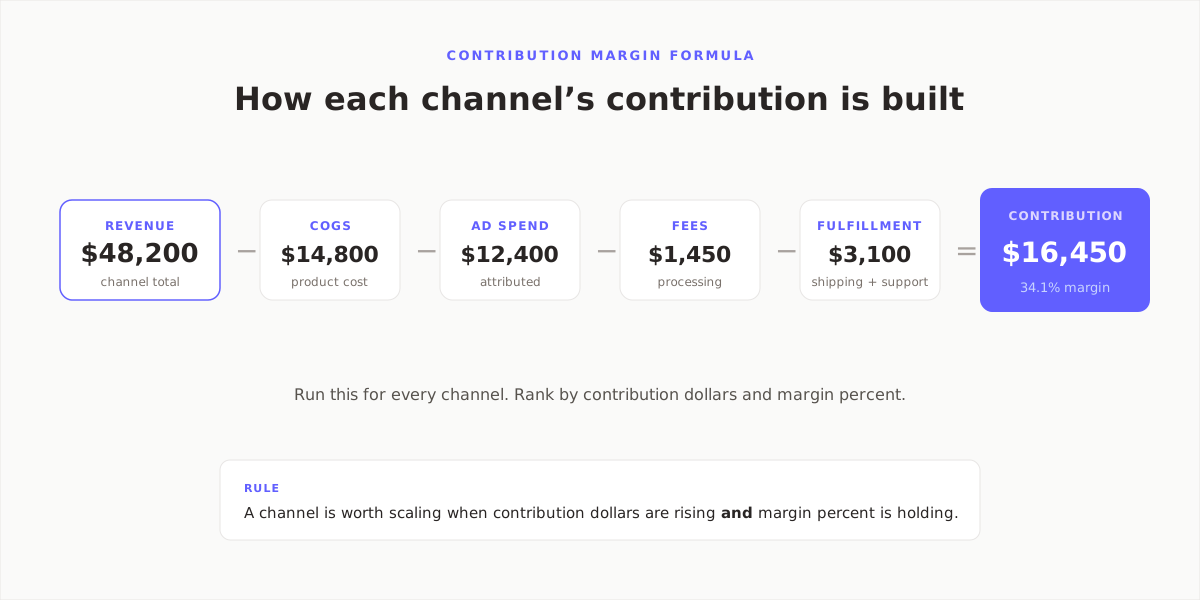
Formula:
Contribution margin (%) = Contribution margin ($) ÷ Revenue
Worked example from the diagram above:
- Revenue: $48,200
- COGS: $14,800
- Attributed ad spend: $12,400
- Processing fees (2.9% + $0.30 per order per Stripe): $1,450
- Fulfillment (shipping + support allocation): $3,100
- Contribution: $16,450 / 34.1%
The math is trivial. The hard part is getting each input cleanly attributed to the channel. That is the next section.
Which variable costs to include
Four buckets, no exceptions. If you omit one, your channel margin is wrong.
1. Cost of goods sold (COGS)
Pull COGS per SKU from QuickBooks, Xero, or your e-commerce back end. Multiply by units sold through the channel. For SaaS, COGS is typically hosting + support + third-party API costs allocated per active customer.
2. Attributed ad spend
Pull spend per campaign from Google Ads and Meta Ads. Attribute the spend back to the channel that the campaign funds. Use whichever attribution model your team has already agreed on (last-click, linear, or data-driven); the model matters less than picking one and sticking to it. See ROI by marketing channel for the attribution rules.
3. Processing and payment fees
Stripe, PayPal, and card processors charge a percentage plus a flat fee per transaction. International cards and FX conversion add 1–2% more. These fees sit on every order the channel produced. Pull them from your processor’s fee export.
4. Fulfillment (shipping, chargebacks, support)
Shipping costs pulled from the 3PL or Shopify. Chargebacks and refunds pulled from the processor. For B2B, add a per-account support cost (total CS hours ÷ active accounts × hourly cost). Allocate to the channel that acquired the account.
How to attribute ad spend cleanly
This is the step that trips up most operators. Three rules that keep it honest:
- Tag everything. Every paid link needs UTMs (source, medium, campaign). If it is not tagged, it cannot be attributed, and the ad spend falls into an "unattributed" bucket that distorts every channel’s margin.
- Pick one attribution model and publish it. Last-click is simplest. Data-driven is most accurate. Whichever one, document it so the marketing and finance teams agree on the same number.
- Reconcile monthly. Ad platforms report spend. Accounting ties spend to invoices. These should match within 1–2%. If they do not, you have rogue campaigns or a billing lag you need to investigate.
How to track contribution margin weekly
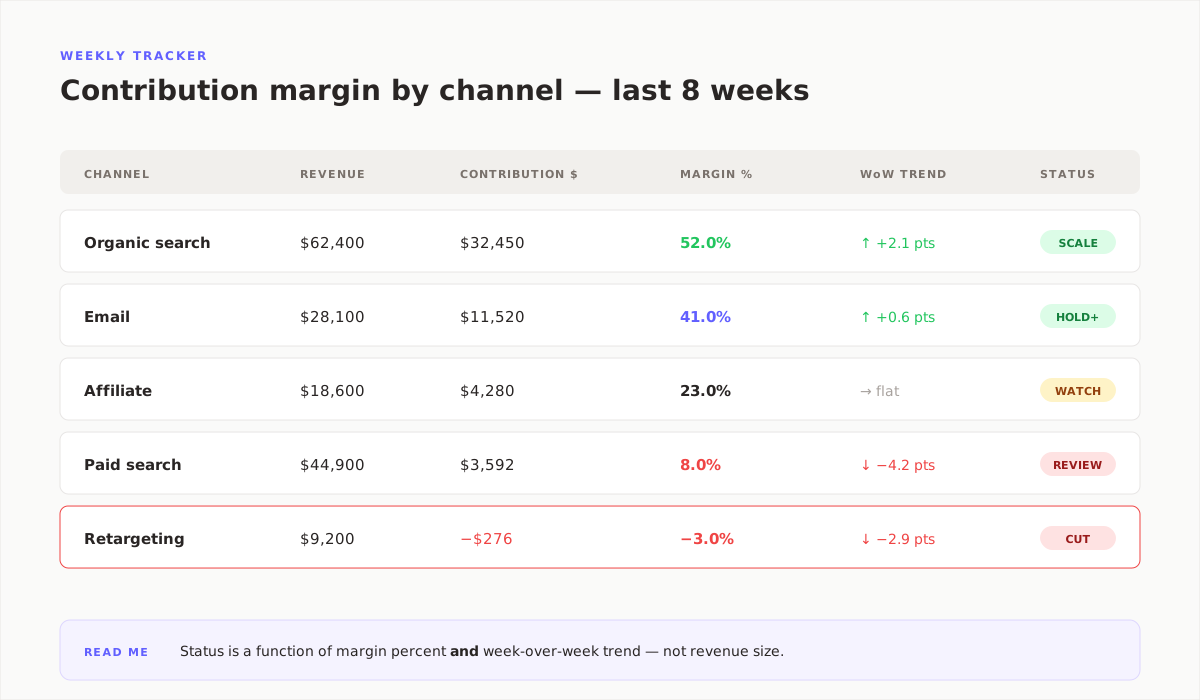
Build a tracker with five columns: channel, contribution dollars, margin percent, week-over-week trend, and status. Populate it every Monday, before the revenue review.
Assign a status to each channel based on margin and trend, not revenue size:
- SCALE — margin > target, trend flat or up. Add budget.
- HOLD+ — margin near target, trend up. Keep spend flat, monitor.
- WATCH — margin near target, trend flat. Review weekly.
- REVIEW — margin below target or trend negative. Diagnose this week.
- CUT — margin negative or trending sharply down with no driver in sight. Pause spend.
What is a good contribution margin by channel?
Benchmarks vary by business model. These are directional, not universal:
| Business model | Healthy channel margin | Review threshold |
|---|---|---|
| B2B SaaS | 55–75% | <40% |
| DTC commerce | 30–45% | <20% |
| B2B services | 45–60% | <30% |
| Marketplaces | 15–25% (of take-rate) | <10% |
A DTC brand with a 42% organic channel and an 8% paid-search channel is normal. A DTC brand where paid search is running at −3% for six weeks is paying to acquire customers. The blended number hides both.
How Fairview calculates channel contribution automatically
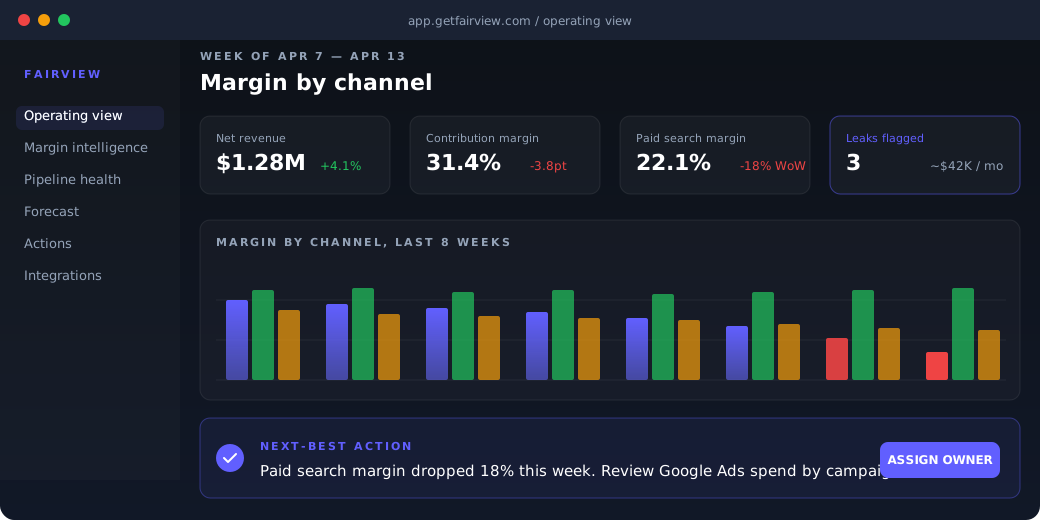
Fairview pulls revenue from Stripe and Shopify, COGS and fulfillment from QuickBooks or Xero, and ad spend from Google Ads and Meta Ads. Once connected, the operating view computes contribution margin by channel on a daily cadence. No SQL, no spreadsheet rebuilds.
When a channel’s margin drifts past a threshold you set, Fairview writes a named next-best action into the Monday report. The goal is simple: by Monday 9am, you already know which channel needs review, which deserves more spend, and what the estimated weekly dollar impact is.
First connection lives in under 10 minutes. See pricing and tiers for the plan that fits your stack.
4
Cost buckets tracked automatically
Daily
Channel margin refresh
23%
Avg margin recovered, first 90 days
Key takeaways
- Contribution margin by channel is the single number that governs budget allocation.
- Subtract four variable cost buckets, not just COGS.
- Gross margin hides channel truth; contribution margin reveals it.
- Track weekly in a five-column view with a status label per channel.
- Act on margin and trend, not revenue size.
See every channel’s real margin this week.
Connect HubSpot or Salesforce, Stripe, and Google Ads. Fairview returns your first channel margin view on day one. 14-day trial, no card required.
Frequently asked questions
Take revenue from the channel, subtract cost of goods sold, subtract ad spend attributed to the channel, subtract payment processing fees on those orders, subtract fulfillment (shipping plus allocated support). Divide the result by channel revenue for the percent. Run the calculation for every channel on the same cadence, then rank by contribution dollars and percent.
Gross margin subtracts only cost of goods sold from revenue. Contribution margin goes further and subtracts every variable cost the revenue triggered: ad spend, processing fees, fulfillment, and support. For channel-level decisions, contribution margin is the right view because it reveals the profit each channel actually contributes rather than its gross product economics.
Healthy B2B SaaS channels run 55–75% contribution margin after COGS, ad spend, processing, and allocated support. Anything under 40% deserves a review. The reason the range is high is that SaaS COGS is relatively low, so the variable-cost drag is mostly ad spend and support hours rather than product cost.
No. Contribution margin by definition excludes fixed overhead like salaries, rent, and software licenses. Those costs do not change when a channel scales up or down, so including them distorts the channel decision. Track overhead separately in operating margin for board reporting and keep contribution margin clean for weekly channel allocation.
Weekly. Paid-media CPMs, processing fees, and fulfillment surcharges all move on a weekly cycle. A monthly refresh lets a 4-point margin slip run for 30 days before anyone sees it. Operators who track contribution margin by channel every Monday catch drift within seven days, before it compounds into a quarter-wrecking leak.
Directly. CAC payback is the number of months it takes a channel’s contribution margin to repay its customer acquisition cost. A channel with a 20% contribution margin pays back CAC twice as slowly as one with a 40% margin, assuming the same ticket size. That makes contribution margin by channel a primary input into the CAC payback period calculation.