.svg)

TL;DR
- Automated CRM data enrichment is a pipeline, not a plugin. It matches records to connected sources, merges fields on a schedule, and logs every write.
- Five source types matter: firmographic, engagement, financial, product-usage, and intent. Firmographic alone is the old definition.
- The pipeline has four stages: identity resolution, source routing, field-level merge with precedence rules, and write-back with an audit log.
- Governance is the hard part. Confidence scores, precedence rules, and reversible writes separate enrichment from data pollution.
- Fairview enriches the operating layer — deals, accounts, pipeline — by blending CRM data with Stripe, QuickBooks, Shopify, and ads data in one model.
A CRM is only as useful as the fields inside it are complete, current, and correct. Most CRMs are none of those things. Automated data enrichment is the system that fixes that — when it is built as a pipeline with governance, not a one-off import.
Walk into almost any B2B company and pull a sample of 100 accounts from the CRM. Count the ones where employee count is blank or three years old. Count the ones where MRR is missing despite an active Stripe subscription. Count the ones where the last meaningful engagement is a typo in the notes field. That gap is what automated enrichment closes.
This post walks through what automated CRM data enrichment actually is, the five source types that matter for operating decisions, the four pipeline stages that move a field from source to record, and the governance rules that keep the system trustworthy. It is a companion to CRM hygiene, the CRM hygiene glossary entry, and pipeline health metrics.
What automated CRM data enrichment actually is
Definition
Automated CRM data enrichment: the process of filling in missing or stale fields on CRM records (accounts, contacts, deals) using connected data sources rather than manual research. A rule engine matches records to sources, merges the fields on a schedule, and logs every change so the CRM stays complete, current, and trusted as a system of record.
Most people hear "enrichment" and think ZoomInfo or Clearbit appending firmographic data. That is one narrow slice. Modern enrichment is broader: it covers any field that can be derived from a connected system and written back to the CRM with confidence.
The shift matters because the most valuable CRM fields are no longer purely firmographic. They are the ones tied to deal velocity: last product login, invoice status, current MRR, last paid-ad touch, last inbound meeting. None of those live in a third-party data provider. They live in your billing, product, and ads systems. Enrichment is the pipeline that connects them.
Why manual enrichment breaks at scale
Manual enrichment fails in three places. Reps skip fields under deal pressure. The fields that do get filled go stale within a quarter. And when enrichment is someone's "Friday task," it never catches up to new-record volume.
The cost is invisible until a decision depends on a field that is wrong. A forecast built on deal size fields that reps guessed at. A renewal list that misses ten accounts because their plan tier was never updated. A territory split based on employee counts that were correct in 2023. Decisions made on half-empty records are the reason operating teams stop trusting the CRM and rebuild the same numbers in a spreadsheet.
Automated enrichment removes that tax. It is not about doing manual work faster. It is about making the record system self-maintaining so reps can stay on deals and operators can stop double-entering data.
The five enrichment source types that matter
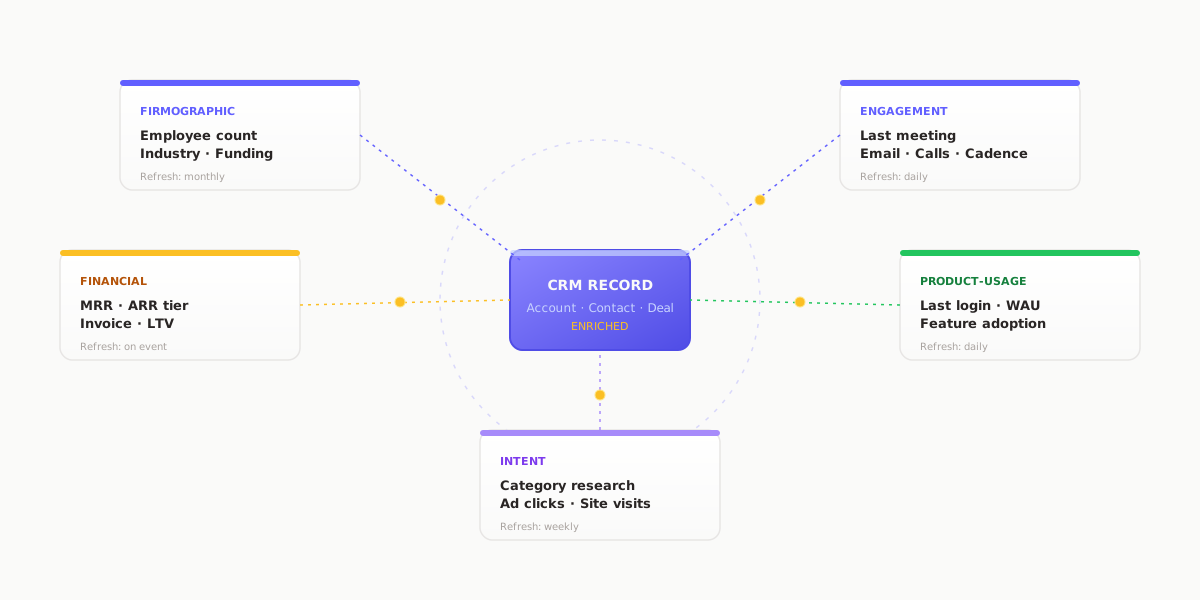
Not every source is equal, and not every field should be enriched from every source. Pick the right source for each field, and write the precedence down before a single record updates.
- Firmographic. Employee count, industry, HQ, funding stage, tech stack. Source: third-party data providers or open directories. Refresh monthly; these fields move slowly.
- Engagement. Last meeting, last email reply, last call, meeting cadence over 90 days. Source: Gmail, Outlook, calendar, meetings tooling. Refresh daily; the signal decays fast.
- Financial. MRR, ARR tier, invoice status, payment method, customer lifetime value. Source: Stripe, QuickBooks, Xero. Refresh on event, not on schedule.
- Product-usage. Last login, feature adoption, seat count, weekly active users. Source: product analytics or your own events pipeline. Refresh daily.
- Intent. Recent research on your category, content downloaded, ad clicks, site visits. Source: intent providers, ads platforms, first-party analytics. Refresh weekly.
A mature enrichment setup pulls from at least three of these five. Pulling from only firmographic is the 2018 version and explains why most CRMs still feel stale even after an enrichment tool is installed.
Key insight
The most valuable CRM fields are derived, not bought. A vendor can sell you employee count. Nobody can sell you last-login or current-MRR for your accounts. That is enrichment from your own systems.
How the enrichment pipeline works
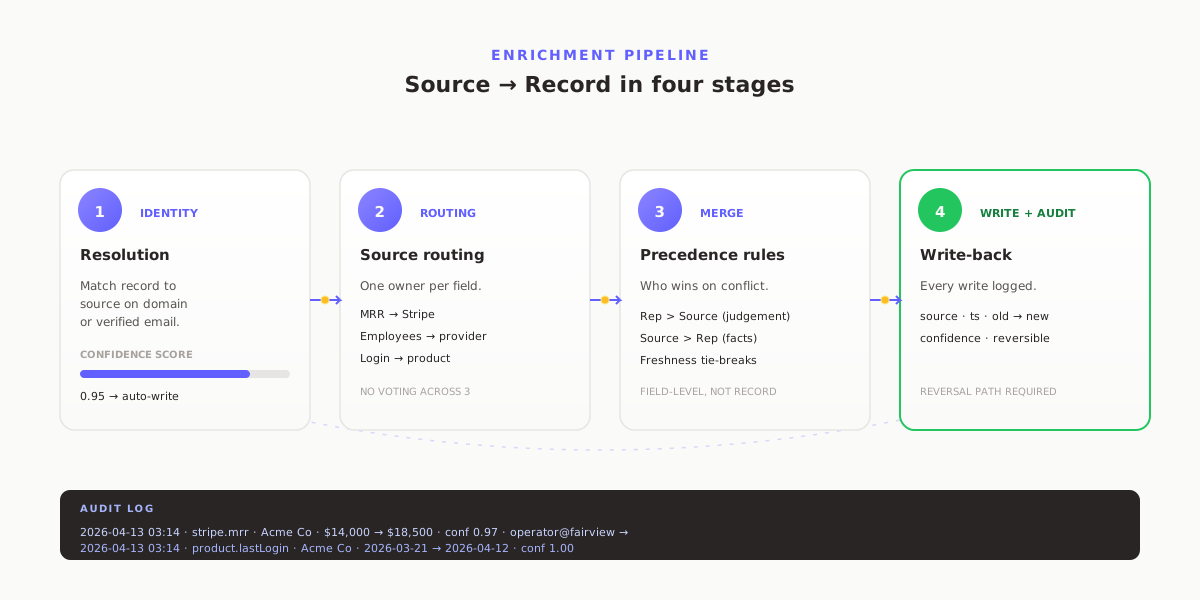
The difference between an enrichment pipeline that works and one that pollutes the CRM is how cleanly these four stages are separated.
Stage 1: Identity resolution. Match each CRM record to the right row in each source. For accounts, usually on domain or a resolved company ID. For contacts, on verified email. The match needs a confidence score, not a boolean. A match at 0.6 gets queued for review; a match at 0.95 writes automatically.
Stage 2: Source routing. For each field you want to enrich, declare which source owns it. Employee count → data provider. MRR → Stripe. Last login → product analytics. One owner per field, not a vote across three.
Stage 3: Field-level merge with precedence rules. Decide what happens when the source and the CRM disagree. Rep-entered beats source for judgement fields (next step, deal stage). Source beats rep for fact fields (MRR, employee count) where the rep cannot know the live number. Freshness tie-breaks the rest.
Stage 4: Write-back with audit log. Every write records the source, timestamp, old value, new value, and confidence. Enrichment without an audit log is not enrichment; it is data corruption with good intentions. The log is what lets you reverse a bad batch instead of rebuilding the CRM from backup.
The governance rules that keep it trustworthy
Enrichment goes wrong in predictable ways. Governance is how you catch the failure modes before they touch a record.
- Confidence threshold per field. A field only writes when match confidence crosses a threshold. Firmographic matches can write at 0.85; financial writes should require 0.95 because the cost of a wrong MRR is higher than a wrong industry.
- Rep-override protection. If a rep edited a field within the last 14 days, do not overwrite it without review. Rep edits are signal, not noise.
- Change-volume circuit breaker. If a scheduled run is about to change more than 10% of records on a single field, pause and require approval. Runaway writes are how one bad source corrupts ten thousand records overnight.
- Reversible writes. Every enrichment write has a reversal path. If the audit shows a bad batch at 3am, one operator can undo it in five minutes.
- Ownership of the field map. One person owns the precedence rules. Enrichment without an owner drifts inside a quarter.
Quote-ready
Enrichment without an audit log is not enrichment. It is data corruption with good intentions.
What clean enrichment unlocks
A fully enriched CRM is not the goal. It is the prerequisite for everything else operating teams want from the system.
- Segmentation that reflects reality. Enterprise vs mid-market stays accurate as accounts grow or contract, not as they looked at contract signature.
- Forecasts with fewer holes. Deals with missing fields drop out of most forecast models. Enriched records stay in.
- Renewal and expansion signals. Last-login plus MRR plus engagement is a churn early-warning system. None of those fields are useful in isolation.
- Territory and quota planning that do not punish reps. Planning against stale account data is how good reps end up with bad territories.
- Operating reviews that use the same data twice. If your Monday deck rebuilds numbers the CRM already has, the CRM is not enriched.
How Fairview enriches the operating layer automatically
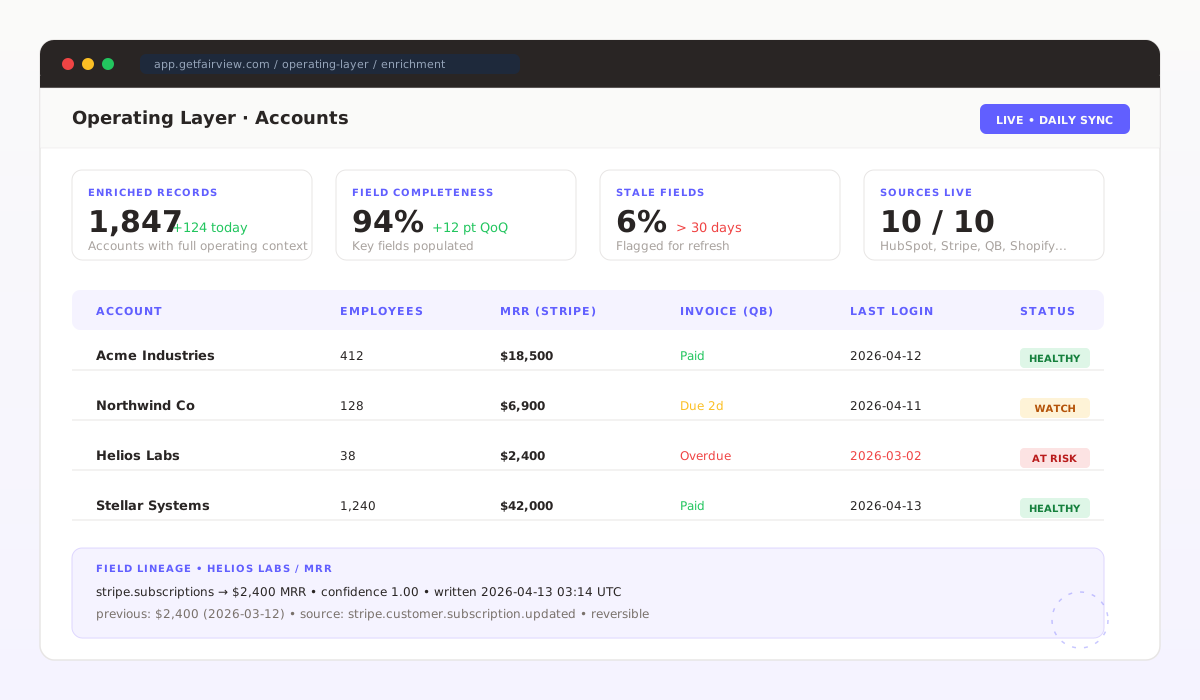
Fairview takes a different angle on enrichment than a traditional CRM-write vendor. The Data Connection Layer connects HubSpot, Salesforce, and Pipedrive alongside Stripe, QuickBooks, Xero, Shopify, Google Ads, Meta Ads, and HubSpot Marketing Hub. Instead of writing enriched fields back into the CRM, Fairview builds the enriched operating layer — the one your dashboards, forecasts, and margin views already need.
That means deal records in Fairview are joined to the actual Stripe MRR for the account, to QuickBooks invoice status, to ad-spend attribution, and to the latest pipeline-coverage position. The Operating Dashboard and Margin Intelligence views render against that enriched layer directly. Teams that also need fields written back into the CRM can combine Fairview with a traditional enrichment tool; the two are complementary, not overlapping.
See pricing and plans for the tier that fits your stack.
10
Native sources blended into the operating layer
Daily
Scheduled refresh with event-driven financial sync
Audit
Full lineage on every enriched field
Key takeaways
- Treat enrichment as a pipeline with governance, not a plugin. The four stages are identity resolution, source routing, field merge, and audited write-back.
- Pull from five source types, not one. Firmographic alone is the old definition and explains most stale CRMs.
- Declare a single source of truth per field. Voting across three sources is how you end up with none of them correct.
- Governance is the hard part: confidence thresholds, rep-override protection, circuit breakers, and reversible writes.
- Fairview builds the enriched operating layer from your existing CRM, billing, commerce, and ads sources — no code required.
Stop running decisions off half-empty CRM records.
Connect HubSpot, Salesforce, or Pipedrive alongside Stripe and your ads accounts. Fairview returns a fully enriched operating layer on day one. 14-day trial, no card required.
Frequently asked questions
Automated CRM data enrichment is the process of filling in missing or stale fields on CRM records using connected data sources rather than manual research. A rule engine matches each record to the right source, merges fields on a schedule, and logs every change. The goal is a CRM that stays complete, current, and trusted as a system of record without pulling reps off deals to update fields.
Third-party providers sell firmographic data: company size, industry, tech stack. Automated enrichment is the broader pipeline that can also pull engagement data from email and meetings, financial data from Stripe or QuickBooks, product-usage from analytics, and intent from ads platforms, then write the right fields to the right records. Providers are one possible source in the pipeline, not the pipeline itself.
Start with fields that reps either skip under deal pressure or guess at: employee count, industry, funding stage, MRR or ARR tier, last meaningful engagement, product-usage tier, and renewal or expansion signals. Fields that reflect rep judgement, like next step or deal stage commit, should stay manual. Enrichment is for facts and events, not forecasts.
Firmographic fields can refresh monthly because the data moves slowly. Engagement and product-usage fields need daily refresh because the signal decays within a week. Financial fields should refresh whenever the upstream source writes a new event, not on a schedule. A sensible default is a nightly batch for most fields with an event-driven path for anything that triggers an alert.
The two main risks are overwriting correct rep-entered fields with stale source data, and creating duplicate records when identity matching is loose. Both are governance failures. A working pipeline uses per-field confidence thresholds, precedence rules (rep wins vs source wins), a change-volume circuit breaker, and a full audit log so any write can be traced and reversed.
Yes. The work is structural, not technical. You need connected sources (CRM, billing, product, ads), an identity-matching rule, a field-level precedence rule, and an audit log. Operating intelligence platforms like Fairview run this pipeline across HubSpot, Salesforce, and Pipedrive without code, so a single operator can keep the operating layer enriched without writing SQL or hiring a data engineer.