.svg)
TL;DR
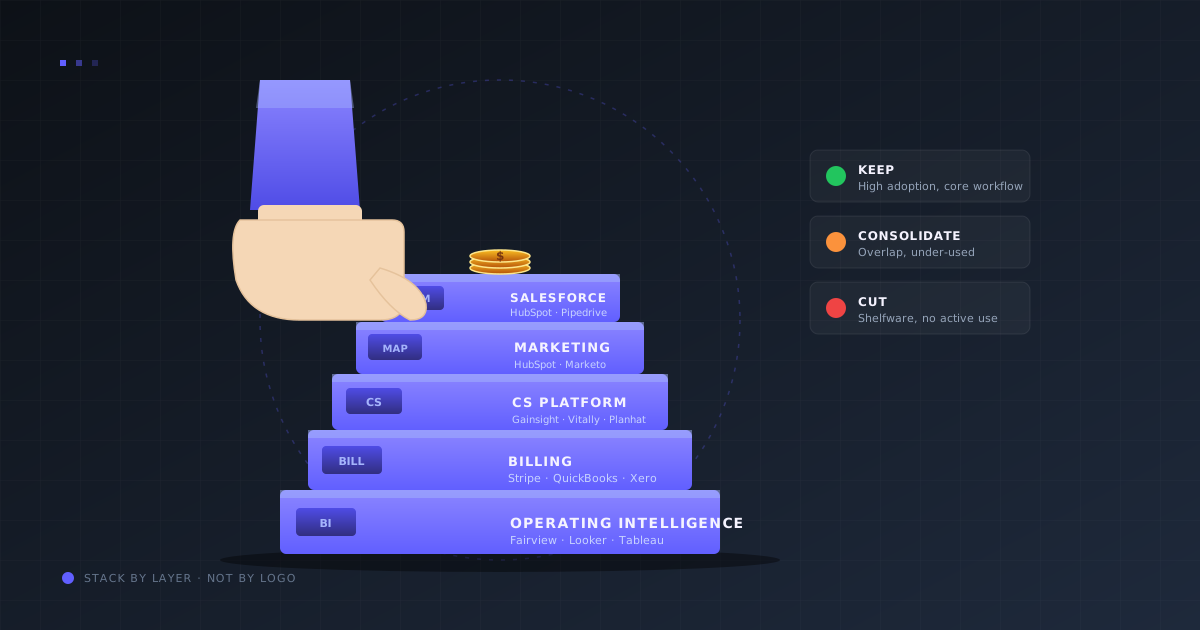
- A modern RevOps tech stack has seven layers: CRM, MAP, sales engagement, CS platform, billing, data warehouse, and operating intelligence. Buy one tool per layer — not three.
- Spend 5–8% of ARR on the stack. Under $2M ARR most stacks live at 1–2%; past $10M they climb to 5–7%. Above 8% almost always means shelfware.
- Tool choice follows ARR stage, not vendor hype. Under $10M, all-in-one suites (HubSpot) beat best-of-breed on time-to-value; past $10M the trade-off flips.
- A tool is shelfware when weekly active use is under 40% of licensed seats. Audit quarterly and cut before renewal.
- Layer 7 is where the stack pays back — one operating intelligence view unifying CRM, billing, and ad-platform data so the weekly review does not rebuild itself from spreadsheets.
A RevOps tech stack is the set of tools a Revenue Operations team uses to run the revenue engine end-to-end. Built well, it pays for itself many times over. Built badly, it becomes a $400K-a-year line item that no one fully uses.
The pattern is familiar. A VP buys a best-in-class tool on a Monday. Six months later, 40% of the team has stopped logging in, reports still come from a separate spreadsheet, and the bill renews on autopilot. Repeat across seven vendors and the stack is suddenly eating 15% of ARR.
This guide covers the seven layers of a modern RevOps stack, the tools that belong in each one, budget guardrails by ARR stage, and the quarterly audit that keeps shelfware from compounding. It is the MOFU companion to What Is RevOps.
What is a RevOps tech stack?
Definition
RevOps tech stack: the set of integrated tools that run the full revenue engine — CRM, marketing automation, sales engagement, customer success, billing, data warehouse, and operating intelligence. One tool per layer, unified by the CRM and a shared data model.
Think of the stack as a ladder, not a toolbox. Each layer depends on the one below it. Buying a Layer 3 sales engagement tool before the CRM is clean is the RevOps equivalent of putting lipstick on the problem; the activity looks nicer but the data underneath is still broken.
Companies that rank in the top quartile for SaaS efficiency typically run five to seven tools in their stack, not fifteen. According to the Scale Venture Partners public SaaS benchmark, the most capital-efficient public SaaS companies spend 5–7% of ARR on their revenue stack. Laggards land at 12% or more because they bought instead of consolidated.
The seven layers of a RevOps tech stack
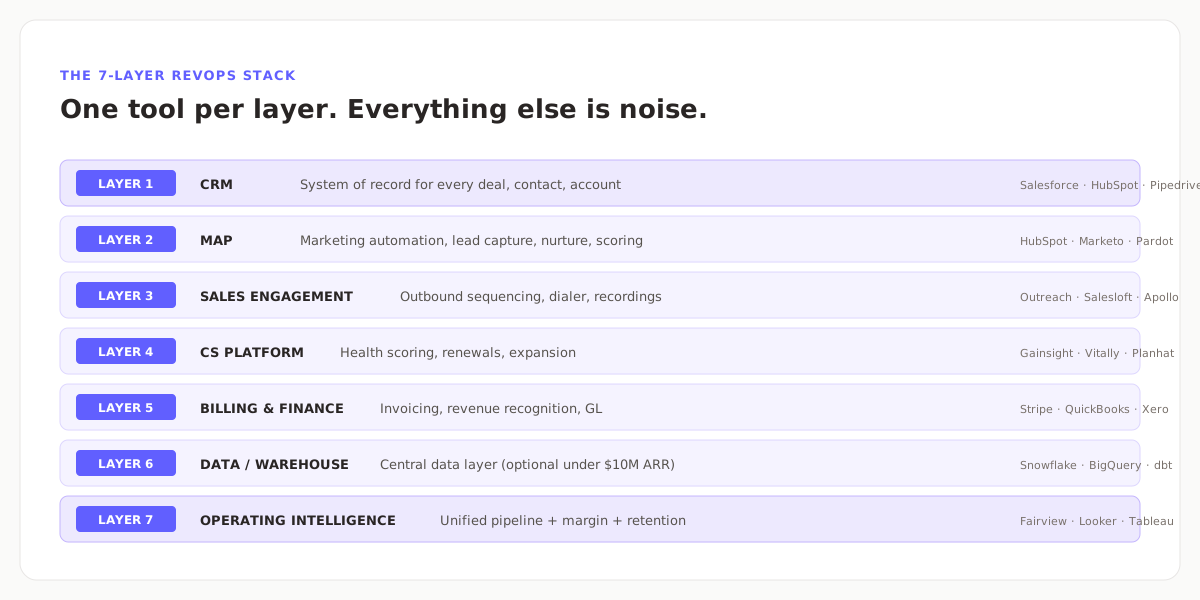
Layer 1 — CRM (the system of record)
Every deal, contact, account, and renewal lives here. Options: Salesforce for enterprise, HubSpot for fast-moving mid-market, Pipedrive for SMB. Whatever you pick, put it in before anything else. The CRM is the foundation every other layer reads from.
Layer 2 — Marketing Automation (MAP)
Lead capture, email nurture, scoring, landing pages. HubSpot Marketing Hub if you already run HubSpot CRM (fastest integration). Marketo or Pardot for enterprise. A MAP without CRM integration is a glorified email tool, so this layer only exists after Layer 1 is stable.
Layer 3 — Sales engagement
Outbound sequencing, dialer, call recording. Outreach, Salesloft, and Apollo are the three serious options. Skip this layer entirely if outbound is not a motion — inbound-led companies often spend $100K on Outreach and realize 90 days in they never needed it.
Layer 4 — Customer Success platform
Health scoring, renewal forecasting, expansion tracking. Gainsight for enterprise, Vitally and Planhat for growth-stage. Until a company crosses ~$5M ARR, a CS tab in the CRM is usually enough.
Layer 5 — Billing and finance
Invoicing, subscription management, revenue recognition. Stripe handles the transactional layer; QuickBooks or Xero handle the ledger. Without clean billing data, no downstream RevOps number is trustworthy.
Layer 6 — Data warehouse (optional under $10M ARR)
Snowflake, BigQuery, or Redshift sits beneath the other layers as the central data store. Most companies do not need this until stack complexity makes direct integrations painful — usually around $10M ARR.
Layer 7 — Operating intelligence
The layer that reads every other layer and produces one unified view: pipeline, forecast, NRR, CAC payback, margin. Fairview, Looker, and Tableau fit here. This layer is where the weekly review stops being a spreadsheet rebuild and starts being a dashboard read.
Budget guardrails: what a healthy stack costs
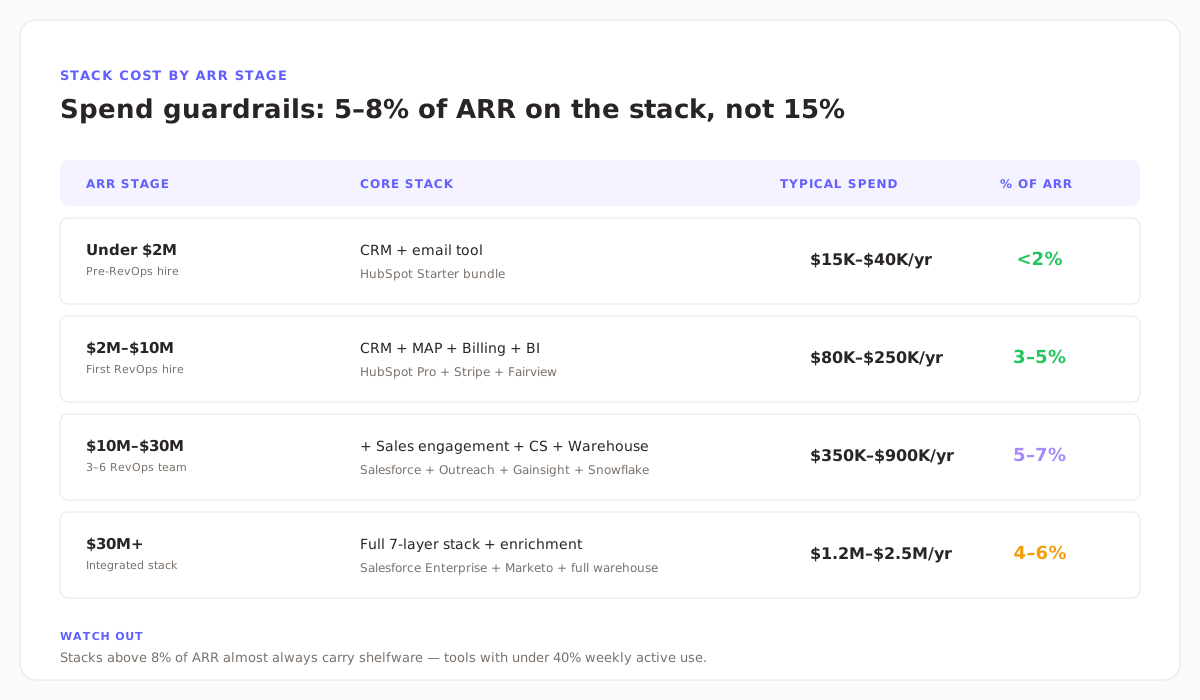
Use the table above as a sanity check, not a rulebook. The important input is not the dollar figure, it is the percentage of ARR. A $12M ARR company spending $1.2M on tools is running a 10% stack — a red flag that rarely survives a CFO review.
Key insight
When stack spend crosses 8% of ARR, the problem is almost never “we need better tools.” It is “we already bought the better tools and never turned off the old ones.”
Best-of-breed vs all-in-one: how to decide
Every RevOps stack eventually faces the same fork. Use this rule of thumb:
| Stage | Preferred approach | Why |
|---|---|---|
| Under $10M ARR | All-in-one suite (HubSpot) | Integrated out of the box, one vendor, faster time-to-value |
| $10M–$30M ARR | Hybrid | Salesforce for CRM, best-of-breed for the one layer that matters most |
| $30M+ ARR | Best-of-breed per layer | Dedicated RevOps team can run them; depth wins on configurability |
Switching approaches later is expensive — migration costs and six months of productivity loss are typical. Pick the trajectory before the first purchase, not after three bad renewals.
The quarterly shelfware audit
Run this every quarter, 30 days before any renewal hits. Three tests:
- Weekly active use ≥ 40% of licensed seats. Below that, it is shelfware. Pull seat usage from the tool’s admin console or SSO logs.
- The tool feeds at least one weekly or monthly report. If no metric the CRO looks at comes out of it, cut it.
- The team does not have a working workaround. If reps are already using a spreadsheet, a Slack channel, or a free tier of something else to do the same job, that is a signal — the paid tool lost.
Tools that pass all three are earning their keep. Tools that fail any one go on the consolidate-or-cut list. Fail two and it is a same-quarter cancellation, not a renewal negotiation.
Five common RevOps stack mistakes
- Buying the top layer first. A BI dashboard with no clean CRM feeds it is an expensive graph generator. Always work bottom-up.
- Three tools at the same layer. HubSpot for marketing, Marketo for campaigns, Pardot for landing pages — one of those is definitely dead weight. Pick one.
- Seat-based licensing you never audit. License count drifts up as the team grows and never drifts down when seats go cold. Audit quarterly.
- Custom-built forecasting tools. Every generation of RevOps lead builds a spreadsheet forecast model. The next one throws it out. Buy instead of build once ARR crosses $5M.
- No warehouse, too early. Adding Snowflake at $3M ARR adds cost and complexity without ROI. Most companies do not need a warehouse until direct integrations start breaking under their own weight.
How Fairview sits on top of the RevOps stack
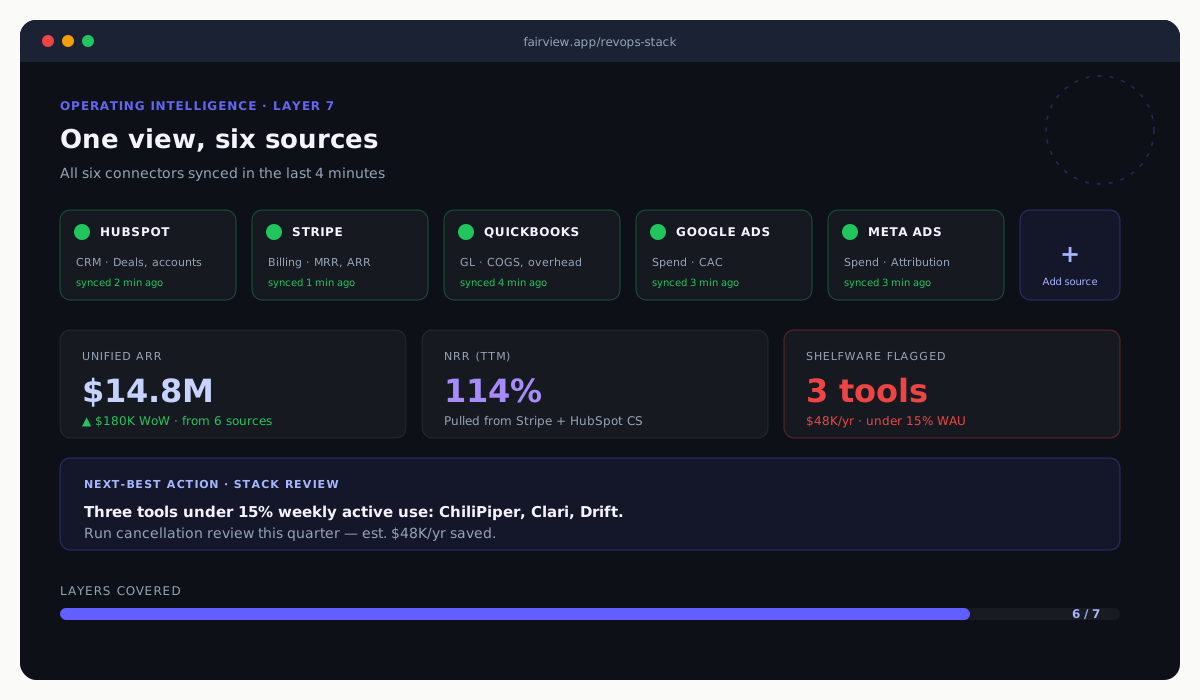
Fairview is the Layer 7 for teams that want an operating intelligence view without building one in Looker or Tableau. Once HubSpot or Salesforce (CRM), Stripe (billing), QuickBooks or Xero (GL), and an ad platform are connected, Fairview returns pipeline coverage, forecast confidence, NRR, CAC payback, and margin in one place.
It also flags shelfware. Connected-source usage data lets Fairview surface tools where weekly active use has dropped below the 40% line, with an estimated annual savings if cut. That alone typically covers the platform cost inside the first quarter.
See pricing and tiers, the product overview, or pair this post with What Is RevOps for the org-side companion.
7
Stack layers covered in one view
5–8%
Healthy stack spend as % of ARR
40%
WAU threshold under which a tool is shelfware
Key takeaways
- A complete RevOps tech stack has seven layers. Buy one tool per layer, not three.
- Budget 5–8% of ARR. Above 8% is a shelfware signal, not a tooling gap.
- Build bottom-up. The CRM and billing layer must work before the BI layer is worth anything.
- Under $10M ARR, all-in-one suites win. Past $10M, best-of-breed earns its price if a RevOps team can run it.
- Run the quarterly shelfware audit. Three tests, 30 days before renewal, same-quarter cuts.
Audit your RevOps stack in under an hour.
Connect HubSpot or Salesforce, Stripe, and QuickBooks or Xero. Fairview returns your unified operating view and flags shelfware on day one. 14-day trial, no card required.
Frequently asked questions
A RevOps tech stack is the set of tools a Revenue Operations team uses to run the revenue engine end-to-end. A complete stack covers seven layers: CRM, marketing automation, sales engagement, CS platform, billing and finance, data warehouse, and operating intelligence. Each layer has one tool, not three.
Between 5% and 8% of ARR is the healthy range. Under $2M ARR most stacks land below 2% because only the CRM and a lightweight MAP are needed. Past $30M ARR spend scales back into the 4–6% range as tools get consolidated. Above 8% is almost always a shelfware signal rather than a tooling gap.
One tool per layer. CRM: Salesforce, HubSpot, or Pipedrive. MAP: HubSpot, Marketo, or Pardot. Sales engagement: Outreach, Salesloft, or Apollo. CS: Gainsight, Vitally, or Planhat. Billing: Stripe, QuickBooks, or Xero. Warehouse: Snowflake or BigQuery. Operating intelligence: Fairview, Looker, or Tableau.
Under $2M ARR, a CRM (HubSpot Starter or Pipedrive) and an email or MAP tool are enough. Add billing once revenue crosses $500K ARR and an operating intelligence layer once the weekly review takes more than three hours to prepare. Everything else can wait until a dedicated RevOps hire lands.
A tool is shelfware if weekly active use is under 40% of licensed seats, the data it produces is not referenced in any weekly or monthly report, or the team has a workaround that bypasses it. Audit every tool against those three tests 30 days before renewal. Tools that fail two of the three are same-quarter cancellations.
Under $10M ARR, all-in-one suites like HubSpot win on integration and time-to-value. Past $10M ARR, best-of-breed tools usually win on depth and configurability, but only if there is a dedicated RevOps team to run them. Switching mid-stream is expensive; decide on the trajectory before the first purchase. See the companion What Is RevOps guide for org-side context.